Up next in 10



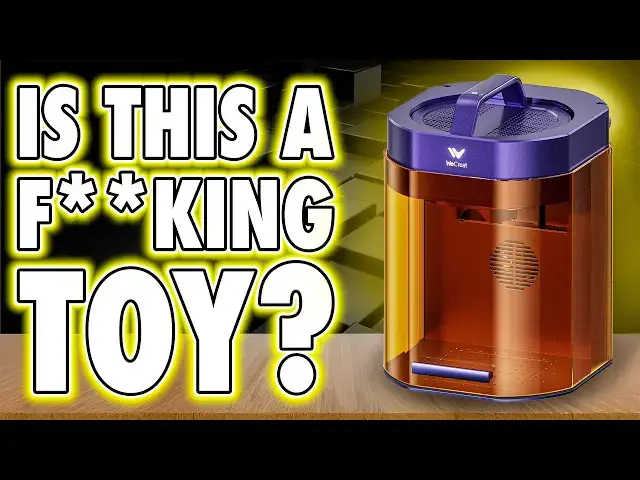
🎯Check out the WeCreat Lumos Laser Here: https://geni.us/WeCreatLumos
🧠 Related Videos – Laser Safety for Beginners:
https://youtu.be/IAf-Z-9_U64
––––––––––––––––––––––––––––––––––––––––––
👉 Want to see if this laser really stacks up against your needs? Watch now.
––––––––––––––––––––––––––––––––––––––––––
🔥 Top Tools & Resources – Resin Printer Enclosures: https://geni.us/ResinPrinterEnclosures
| WARGAMER Resin (best for miniatures): https://yesthats3dprinted.com/pages/wargamer?ref=FauxHammer
| 3D Printer Cleaning Mat: https://geni.us/3DPrinterCleaningMat
🎁 Loot Studios – Sci-Fi Pack: https://geni.us/LootStudiosSciFi
| Fantasy Pack: https://geni.us/LootStudiosFantasy
| Freebies: https://geni.us/LootStudiosFreebies
🎨 Community – Discord: https://discord.gg/dPexM9SeN4
| Facebook Group: https://www.facebook.com/groups/3dprintedminiatures
| Instagram: https://www.instagram.com/fauxhammerblog/
| Website: https://www.fauxhammer.com/
Show More Show Less View Video Transcript
0:00
I honestly can't believe how good this
0:01
little laser is. And if you don't know
0:03
my channel, it does take a lot to
0:05
impress me. Don't get me wrong, this
0:07
isn't wow, incredible, the next big
0:09
thing. But for the everyday home user
0:11
who just wants to get into lasers, we
0:13
create actually do a lot right here. My
0:16
worry is the way it's packaged and
0:18
presented. It's the kind of marketing
0:20
that could easily put people off. First
0:22
up, the name Wreat. And if they wanted
0:24
me to pronounce it wereate, they should
0:26
have spelled it that way. Hi, I'm Ross
0:29
and this is FHammer Videos. So, I need
0:31
to do a quick preface. If this is your
0:33
first video of mine, you need to know
0:35
where I'm coming from so that you can
0:37
relatively understand what I say going
0:39
forward. I'm still very new to lasers. I
0:42
got into them because printer brands
0:43
started sticking laser modules on 3D
0:46
printers, and that's my wheelhouse, 3D
0:48
printing. I wanted proper lasers to
0:50
compare those add-ons to, and I ended up
0:52
falling down the rabbit hole. Now, I
0:54
really love them. But my reviews are
0:56
from the perspective of someone looking
0:58
at these as a home user bringing lasers
1:01
into the house for the first time. So
1:03
rather than parrot the spec sheet, I'd
1:05
rather tell you what it's actually like
1:07
to use these things and where the
1:08
marketing matches reality or doesn't. So
1:13
here's what we say. The Wriat Lumos is
1:16
the world's first 3W infrared and 10
1:18
watt diode portable laser engraver. And
1:22
yeah, that's the immediate thing. the
1:24
world's first claim. Sure, they're the
1:26
first, but only to very specifically put
1:29
a 10 watt diode and a 3W infrared laser
1:32
together, but plenty of other brands
1:34
have mixed different power modules
1:36
without shouting world's first about it.
1:39
It's like me claiming to be the world's
1:40
first YouTuber to drink tea while
1:42
reviewing a 3D printer on a Tuesday
1:44
afternoon in Nottingham. Yeah,
1:47
technically true. Utterly meaningless
1:49
and nobody cares. And that's what bugs
1:51
me. It's almost a snake oil salesmanlike
1:54
vibe that they create with this sort of
1:56
nonsense. They don't need it because the
1:58
machine actually speaks for itself. And
2:01
where it shines is using it. Unboxing is
2:04
simple. Everything's neatly foam packed
2:06
inside. The device itself is in two
2:08
parts, the body and the laser head. Now,
2:11
for this review, I only had the basic
2:12
setup, but the head is portable, and you
2:15
can even get a clip-on shield if you
2:17
want to use it away from the base on
2:19
bigger objects. In desktop mode with the
2:21
body, the head mounts into it and locks
2:24
in with a screw. And they even give you
2:25
this fancy little engraved wrench in
2:28
order to do it and secure it down. But
2:30
lookswise, well, it's the bright purple
2:32
finish. This is definitely a choice. I
2:36
think it's going to put off a lot of
2:37
people who'd prefer something that
2:39
actually looks like professional kit.
2:41
This looks like a toy. If you don't
2:43
agree, that's fine, but please pop that
2:46
down in the comments. I just think the
2:47
style of it is going to make people look
2:49
at it and immediately look away because
2:51
they're after something a bit more well,
2:54
I said it, professional. Anyway, moving
2:56
on. Ports are all tucked around the
2:58
back, power and USB to connect it to a
3:01
computer. And on the back right edge,
3:03
you've got connections for the slider
3:04
extension and rotary tool, neither of
3:06
which I actually had to test in this
3:08
review. Controls are minimal. It's got a
3:11
rotary dial for moving the head up and
3:13
down and an autofocus button that you
3:15
hold and that sets the distance. On the
3:17
top handle is a start, stop, pause
3:19
button that you need to operate jobs.
3:21
It's also got a sliding front cover
3:23
which should block beam scatter. But
3:25
here's a concern I have because I'm
3:27
quite safety conscious with these things
3:29
and I don't want to get in trouble
3:30
because somebody blinded themselves.
3:32
This has no safety certifications listed
3:35
anywhere. It doesn't have a class one
3:37
rating, which would indicate that it's
3:39
safe to use under normal operating
3:42
situations. So, by omission of that
3:45
class one claim, I'm going to assume
3:47
that this is a class 4 device, which
3:49
means it isn't optically safe by
3:51
default. You absolutely need proper
3:54
safety glasses with this and either a
3:56
smoke filter or vent your fumes outside.
3:58
I've got a whole video on safety. I'm
4:00
not going to go over it here, but I just
4:02
wanted to highlight this because these
4:04
emissions raise more red flags than most
4:07
other lasers I've tested. And it does
4:09
have some protections built in. It's got
4:11
flame detection, which genuinely works.
4:13
It actually paused some of my jobs
4:15
midrun. And it also cuts off if you lift
4:18
the cover mid job. The problem is if you
4:21
hit the start button whilst the cover's
4:23
already open, yeah, it'll just happily
4:25
fire a laser beam straight onto the
4:26
surface, which can then reflect into
4:28
your eyeballs. It doesn't prevent you
4:30
from starting a job when the covers open
4:32
and I find that concerning. It's
4:34
definitely something that you need to be
4:36
consciously aware of before operating
4:38
this machine. Also, there's no emergency
4:41
stop button. That's also a concern, but
4:44
I suppose you can just yank out the
4:46
power lead in lie of it. I'd still
4:48
prefer to see an emergency stop. Going
4:51
inside, the center of the base is
4:52
removable. You can swap between a flat
4:54
plate or an included cutting bed.
4:57
There's also a fan and a hose out the
4:58
back which you need to attach. And that
5:00
hose either needs to go out a window,
5:02
out a vent, or into a filter system. We
5:05
create do make their own filter units,
5:07
but I didn't get one with this review.
5:09
But yeah, that's the machine. There's
5:11
some dodgy marketing here. The color and
5:13
the name of the brand make it look cheap
5:15
when it's actually pretty decent. And
5:17
there are some real safety oversightes.
5:20
And I'm going to bring it up again. I am
5:21
struggling with the purple toy light
5:23
design. But usability is where this
5:26
little thing shines. Connection options
5:28
are USB or Wi-Fi. And this isn't just
5:30
some rubbish peer-to-peer system where
5:32
you have to connect the laser directly
5:34
to your phone, cutting the internet from
5:36
your phone. This actually connects
5:38
direct to your home Wi-Fi network. So,
5:41
you can reach it properly at any time.
5:43
That needs shouting about because it's
5:44
quite rare in this price bracket. That
5:47
said, the iOS app was a dead loss for
5:49
me. I couldn't get it to connect at all.
5:51
On PC though, once I plugged it in via
5:53
USB, I could set up Wi-Fi in their app
5:56
and from there it was smooth wireless
5:58
sailing and the software make it is
6:01
pretty intuitive. Yeah, okay. Got to be
6:04
fair, the translations are janky and the
6:06
design library is locked until you
6:08
register the device online, but the
6:10
library is tiny anyway and it's not
6:11
really worth it. And hardly any almost
6:13
none of the designs were created with
6:15
the Lumos in mind. It's they're made
6:17
mostly for Wrat's bigger machines. But
6:19
once you're in the workspace though,
6:21
it's solid. Import designs, add text,
6:23
drop shapes, tweak settings. It's really
6:26
straightforward. It's basically a budget
6:28
knockoff of a much more expensive
6:30
competitor. You probably know who I
6:32
mean. I've reviewed their lasers before,
6:34
but this is cheaper, much cheaper, and
6:36
it works. However, support is another
6:39
story, and it's on par with what I'd
6:40
expect from a brand with this level of
6:42
presentation. When I first started it, I
6:45
tried to use the camera for previews,
6:46
and it was blurry. I contacted support
6:49
and they instantly assumed it was a
6:51
hardware issue and offered to send me a
6:53
replacement. But it turns out all I
6:55
needed to do was run the calibration
6:56
routine which is part of the software.
6:58
And it was a Wreath community member who
7:01
pointed me to it. Problem solved. But
7:03
yeah, the support is basic at best. And
7:06
there's no real user guides on setting
7:08
this machine up. I like to avoid them
7:10
anyway because I want to see how
7:12
intuitive it is. But even when I went
7:14
looking, I couldn't find any guides on
7:16
what might be wrong with this camera.
7:17
And that's quite common with these sorts
7:19
of devices that we're getting from
7:21
overseas. A lot of brands do just kind
7:23
of make them and go, "There you go." and
7:25
leave it to the community to sort out
7:27
all the quirks. We've had it loads in 3D
7:29
printing, and it's only now that 3D
7:31
printing brands are taking things
7:33
seriously and offering user guides and
7:35
setup routines and support for the
7:38
average home user. Moving back to
7:39
usability though, this is genuinely a
7:42
machine you can get results with fast
7:44
from nothing to engraving in hours and
7:46
you can do some semi-advanced jobs
7:48
within days. Just remember safety
7:50
glasses and ventilation are
7:52
non-negotiable and it does have some
7:54
limits. The work area is 116x 116 mm,
7:58
which is pretty small. And you'll also
8:01
notice some darker spots in the corners
8:03
when you're actually in the app. And
8:04
these are the areas where cuts are going
8:06
to struggle because the further you are
8:08
from the center, the more power you lose
8:10
in the laser beam cuz it has to travel a
8:12
further distance. And the camera
8:14
overlay, this is more of a guide than
8:16
precise alignment. Weirdly, the corners
8:18
are quite accurate, but the center
8:20
isn't. It's normally directly below the
8:22
camera that's accurate, and in this
8:24
case, that camera is at the front of the
8:26
laser head towards the cover, and then
8:28
the further you get from it, the less
8:30
accurate it is. But here, the corners
8:32
were accurate. the center wasn't. And
8:34
this isn't an issue unique to this
8:36
brand. I haven't seen anybody nail this
8:38
yet, even the most expensive ones. So,
8:41
again, this is a guide, not gospel. But
8:44
then we move on to color engraving. I've
8:46
been really excited to try this. Their
8:48
website shows these gorgeous, rich
8:50
gradients on stainless steel, and in
8:52
reality, I could not replicate it, and I
8:55
ran out of material trying to get this
8:57
to work. The best I managed was a faint
8:59
blue sheen and some yellowing through to
9:01
black. So, if you're looking at their
9:03
rainbow marketing shots, this probably
9:06
can do it with their marketed beam focus
9:09
2.0 technology that well that seems to
9:12
be able to simulate pulses, usually only
9:14
available on more powerful fiber lasers.
9:16
But yeah, personally, I couldn't get the
9:18
nuance of it across multiple tests. And
9:20
I've only managed to see it working in
9:22
other people's reviews. So, that's on
9:25
me. I've got some work to do. But
9:27
overall, for a multi-purpose laser
9:29
engraver that can do everything from
9:31
wood to metal, I mean, it's not going to
9:32
do deep detail depth engraves or
9:34
challenge coins. But for surface
9:37
engraving and some very small area
9:39
cutting, I've got to be honest, this is
9:42
a solid machine. But I do think it sells
9:44
itself short with some marketing claims
9:47
being inflated along with again just the
9:50
style and presentation. Please go and
9:52
check out the website yourself. Am I
9:54
wrong? But I think this is quite
9:55
off-putting to far more people than it
9:58
really should be. They do come across
10:00
like a cheap knockoff toy- like product
10:03
when in actual fact it's not a toy.
10:06
Yeah, the other elements are still true.
10:08
It is cheaper and it takes a lot of
10:09
liberties from what other brands have
10:11
delivered. But I've got to be fair, it
10:13
does the job. It's easy to use and the
10:16
community has been absolutely fantastic.
10:18
Even better than the brand's own
10:19
support. So seriously, if you're after a
10:22
simpletouse laser and you now know and
10:25
can accept the limits of this one, for
10:27
the average home user, this is far more
10:29
better than most. And it's because of
10:31
usability. I turned my nose up at it
10:34
based on its looks alone. So, I was
10:36
genuinely happily surprised to find out
10:38
how well it performed and how simple it
10:41
was to operate. And if you do consider
10:43
getting one and this video has been
10:44
helpful, I'll put an affiliate link in
10:46
the description and I hope you'll
10:47
consider using that. I'll make a
10:49
commission on the sale. It's at no cost
10:51
to you. It's totally optional, but it's
10:53
how I fund the channel. And if you think
10:55
I'm just saying positive things about
10:56
this one because I get a commission, I
10:59
get a commission on all the things I
11:00
review. Go and check out some of my
11:02
other laser reviews. I'm not afraid to
11:03
say what I think. In this case, yeah, I
11:06
think it's good. Cheap. Looks dafted,
11:08
but it is good. I want to finish by
11:10
saying thanks for watching with a huge
11:11
thanks going to our members who are on
11:13
screen now. Please consider joining them
11:15
for early access, your name in the
11:16
credits, Discord rolls, and exclusive
11:19
videos. Until next time, Noox. Faux
11:23
Hammer out.
11:28
[Music]