Up next in 10



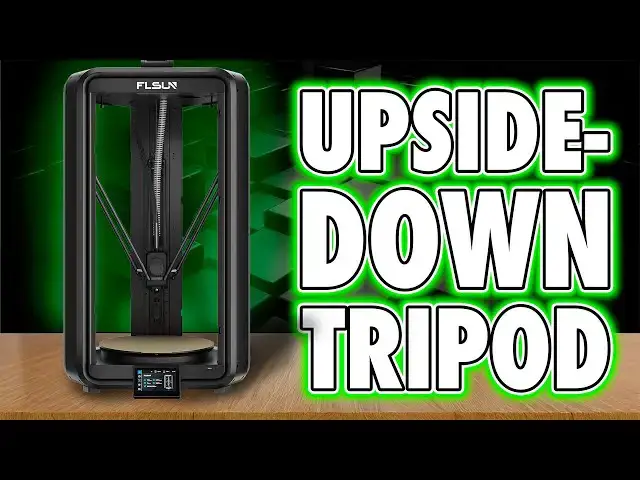
🔗 Check out the FLSUN T1 MAX here: https://geni.us/FLsunT1MAX
🎨 Support the channel and fuel your hobby addiction!
🛡️ Loot Studios Sci-Fi Models – https://geni.us/LootStudiosSciFi
🧙 Loot Studios Fantasy Miniatures – https://geni.us/LootStudiosFantasy
🎁 Free Loot Minis – https://geni.us/LootStudiosFreebies
🎧 Listen to me rant on @ThePaintingPhase
📏 Calibrate your resin printer like a pro – https://youtu.be/Gm0-z971tgY
🧼 Grab a 3D Printer Cleaning Mat – https://geni.us/3DPrinterCleaningMat
🖌️ Artis Opus FauxHammer Essentials Brush Set – https://store.artis-opus.com/products/fauxhammer-mixed-brush-set-5-brush-deluxe
🧵 More from FauxHammer
Website: https://www.fauxhammer.com/
Facebook: https://www.facebook.com/groups/3dprintedminiatures
Discord: https://discord.gg/dPexM9SeN4
Instagram: https://www.instagram.com/fauxhammerblog/
Twitter: https://twitter.com/FauxHammerBlog
Show More Show Less View Video Transcript
0:00
I've just had my first proper go with
0:01
the Delta printer. The FL Sun T1 Max
0:04
landed here. And I'll be honest, until
0:06
now, my entire knowledge of Delta
0:07
printers was they look like upside down
0:09
tripods doing a maple dance around a
0:12
hotend. And now I've built one, run it,
0:14
and spent a week or so with it. It turns
0:16
out they're kind of fun, but mostly
0:18
hypnotic to watch. And this one, it's
0:21
pretty big. So, if you've wondered what
0:23
delta printers are and what the value of
0:25
them is, stick around because I had that
0:28
same question coming into this. Hi, I'm
0:30
Ross and this is Fauxhammer Videos. And
0:33
this, as I said, is the T1 Max, FL's
0:36
cheaper, smaller sibling to their
0:38
flagship S1 Pro. That one costs over a
0:41
grand. This one is about half the price.
0:43
Still not pocket money, but cheaper than
0:45
explaining to your partner why you just
0:47
spent the holiday fund on another bloody
0:49
printer. So, here's what it actually is.
0:52
It's weird. If this is your first look
0:54
at a Delta, let's understand the
0:56
mechanics. Three arms move up and down
0:57
on belts independently to control the
0:59
hotend's position in both horizontal and
1:02
vertical space. But due to how this
1:04
moves, your build area is now a circle
1:07
with a diameter here of 300 mm. Now,
1:10
whilst this is called the Max, it's
1:12
because it's larger than the T1, which
1:14
is only 260 mm. But honestly, this is
1:17
still 20 mm shorter than the flagship
1:20
S1. And it kind of makes me shrug at the
1:22
name Max in favor of something more
1:24
accurate. They they should have called
1:26
it the plus. Yeah, should have been
1:28
called the T1 Plus. Anyway, it's also
1:30
worth understanding that it's only in
1:32
the center of this circle that you can
1:34
go up to its maximum height of 297 mm.
1:38
At the edges, you lose some height
1:40
because of the way the hotend can move
1:41
and that maxes out at 251 mm. It sounds
1:45
like a weird limitation, but that's just
1:47
the geometry of Delta printers. three
1:49
columns moving the head around in arcs,
1:51
which looks mad until you realize it's
1:53
just math. The whole machine stands at
1:55
830 mm tall, and that's before you stick
1:59
the swool holder on top. And it takes up
2:01
a footprint of around 510x 510 mm. But
2:05
the weight is only 16 kilos,
2:07
surprisingly light for the size of it.
2:09
The frame is steel, but you'll only
2:11
really see the plastic housing covering
2:13
the body. And when I first saw this in
2:15
pictures, I assumed it had arrived
2:17
preassembled. But no, this actually
2:19
comes flat packed. To build it, you just
2:21
seat the three arms into the base, put
2:23
the top on, secure the screws, and mount
2:25
the mechanics. The difficult bit is
2:27
understanding some of the cabling, and
2:29
the translations in the manual aren't
2:31
exactly fantastic. It's straightforward
2:33
once you know how, and that's made much
2:36
easier by the video guide you get with
2:37
the machine. The extruder is a direct
2:40
drive system with hardened steel gears
2:42
and the hotend is capped at 300° C and
2:45
comes with a hardened steel nozzle by
2:47
default. Now FL Sun claims a,000 mm a
2:50
second on the box. In the real world,
2:52
you won't hit that without the model
2:54
turning into string art, but even
2:55
running it sensibly, it's still quick.
2:58
The limit with FDM printing speed isn't
3:00
really how fast the tool head moves,
3:02
though. It's material calling. I've said
3:04
for ages that it's great these machines
3:06
are moving faster. If we can't extrude
3:09
and then harden the material through it
3:11
at those speeds, what's the point? Well,
3:14
we'll come back to that. The bed is a
3:16
single-sided textured PEI steel sheet
3:19
that slides semi easily into place
3:21
thanks to the rim at the back. This will
3:23
heat to 100° C, which is solid for PLA,
3:26
PETG, ABS, and even some composites, so
3:30
long as you can keep the drafts off and
3:32
don't print it in a freezing cold room.
3:34
But this has no enclosure, so it's more
3:37
aimed at those lower temp materials when
3:39
using it at home, which means the bed
3:41
being 100° and the hot end at 300
3:45
maybe kind of pointless. But anyway,
3:47
it's the cooling that I think is pretty
3:49
awesome. Rather than fans in the hotend,
3:51
there's actually a blower up in the roof
3:53
of the machine piping air down to the
3:55
nozzle via a hose. And this keeps that
3:57
moving mass down and helps with those
3:59
tool head movement speeds that we just
4:01
talked about. In an enclosed printer,
4:03
this could also be used to pull in
4:04
cooler air from outside the printer, but
4:07
again, this isn't enclosed and there's
4:09
no official upgrade kit. The touchcreen
4:11
mounts onto the front at the bottom. So,
4:13
whilst you might consider putting this
4:15
on the floor for fitting it in your
4:16
office, any direct onachine maintenance
4:19
would then need to be done on your
4:21
knees. Connectivity includes Wi-Fi on
4:23
both 2.4 and 5 GHz, which is worth
4:26
pointing out because there are still
4:27
budget printers in 2025 that are
4:30
shipping with 2.4 4 GHz only like it's
4:32
the stone age. Anyway, that's the paper
4:35
spec. Let's get to talking what it's
4:37
actually like to get going. And well,
4:39
it's pretty straightforward. We talked
4:41
about assembly before. It's like a
4:43
modern Macano set. A couple of dozen
4:44
screws. Nothing you'll need power tools
4:46
for. And they even give you magnetic
4:48
covers for the extrusion gaps so stray
4:50
bits of filament don't fall into the
4:52
guts. It's a small touch, but it's
4:54
appreciated. These are 3D printed
4:57
elements, however. Once you've built it,
4:59
switch it on, the fun begins. There's no
5:01
setup wizard, though, no welcome process
5:04
or OB out of box experience. So, once
5:07
you're on the main screen, you need to
5:09
manually run both the input shaping and
5:11
then the bed leveling, which actually
5:13
runs twice, and the screen just says bed
5:15
leveling the whole time. You've got no
5:17
idea how far along it is. A progress bar
5:19
would have saved a lot of standing
5:20
around and wondering if it's actually
5:22
bricked itself, and that's why it's
5:24
running through the process twice. Now,
5:26
when it comes to filament loading, this
5:27
is where things get a bit silly on this
5:30
machine. Rather than sensibly offering a
5:33
filament mount to go above, they give
5:35
you this weird 3D printed stand with a
5:37
couple of rollers on it and a couple of
5:39
sticky tabs so you can attach it to the
5:41
top. This doesn't offer a fantastic
5:44
hold, and if you've got damaged
5:45
cardboard spools, I expect they'll
5:47
struggle. And well, honestly, yeah, this
5:50
is just cheap and nasty. The filament,
5:52
however, goes down through the lid and
5:55
straight into the extruder. So,
5:56
placement wise, this is actually pretty
5:58
good for materials like TPU. It's just a
6:01
shame about that dumb roller. And whilst
6:03
it's unrelated, this is something that's
6:06
my fault, but worth talking about whilst
6:07
we're discussing filament, this roll of
6:10
red I used was actually tangled. So, I
6:12
came down one morning to find the
6:14
machine extruding nothing into thin air
6:17
and the filament was jammed on top.
6:19
Thankfully, there was no clog in the
6:21
extruder gear, but some kind of tangle
6:24
detection on this unit would have been
6:25
nice to have. You don't get that here.
6:28
Now, also on the hotend, this just is a
6:31
bit legacy in terms of design. There's
6:33
no quick swap nozzle, and you'll need to
6:35
pull the whole print head out of its
6:37
body enclosure if you ever need to do
6:39
any extruder maintenance. But
6:41
printing-wise, this chucked out a decent
6:43
benie in just over 25 minutes, where
6:46
most of my Corxy printers would take
6:48
nearer 35, if not more. So that's nearly
6:52
a 30% speed increase. And if you're
6:54
after a faster printer and want to know
6:56
the benefits you can expect here, I
6:58
often tell people just download the
7:00
slicers and put your models in and slice
7:02
them. That'll tell you how long things
7:04
will take. It's a great free check that
7:06
many people forget to do, and it works
7:08
with build volume, too. You can actually
7:10
emulate a lot of 3D printers just by
7:13
playing with the slicers. Anyway,
7:15
speaking of the slicer, FL Sun, like all
7:18
brands now, have their own version of
7:20
Orca. At the time I tested it, the
7:22
profile wasn't available for this
7:24
machine in the original Orca slicer, but
7:26
I'm sure it'll be there before long. And
7:28
I did a ton of FDM tests on this printer
7:31
all in one go. And I've got to say,
7:33
quality-wise, they all came out solid.
7:35
I'm impressed with both the accuracy,
7:37
the stability, and the speed with a lack
7:40
of stringing along with some decent
7:41
bridging quality, too. However, there
7:44
were definitely signs of overextrusion
7:46
because I was actually struggling to
7:48
move the pins on the toaster test where
7:50
I can normally move at least the first
7:52
three, if not four. And whilst I'm
7:54
printing stuff, here's a cool little
7:55
hatchet, which was actually made by the
7:57
Eternal Forge, who you'll probably
7:59
recognize from all those hammers I made
8:01
in previous reviews. Well, now he's back
8:03
with another campaign of little trinkets
8:05
for cosplaying war gamers that you can
8:07
check out. Now, I make nothing from
8:09
promoting this guy other than he now
8:11
sends me the files early so I can show
8:13
you. And I want him to make more files
8:16
like this so I can print them myself.
8:18
That's why I want to support him.
8:19
Anyway, I'll put a link in the
8:21
description if you want to check it out.
8:22
I'm sure he's got more hammer-like
8:24
things coming in the future. But anyway,
8:26
the point is when it comes to this
8:28
machine, I get it now. I understand the
8:31
value of a Delta printer. It's mostly
8:34
the speed. And yeah, to be honest, while
8:35
it's flying about, it does look bloody
8:37
cool when it's printing. But in all
8:39
honesty, I'm just not convinced it's the
8:42
Delta mechanism itself doing all of the
8:45
heavy lifting here. I think the real
8:47
heroes are probably the high flow hotend
8:49
and that blower doing the cooling. Those
8:51
extrusion speeds are undeniable, but the
8:54
platform, it's a strange one. Maybe I'm
8:57
just conditioned to prefer a boxy Core
8:59
XY because the shape of this is awkward
9:03
to fit in most home setups. The build
9:06
volume did worry me at first before I
9:08
got hands- on, but in practice, a 300 mm
9:11
diameter and nearly 250 mm of height
9:14
isn't that bad at all. Yeah, you won't
9:16
be knocking out cosplay helmets easily,
9:18
but if you need tall prints, this makes
9:21
sense. As for this specific model, the
9:24
T1 Max, got to be honest, it didn't blow
9:27
me away beyond the novelty of it being
9:29
my first Delta. The cheap spool holder,
9:32
no camera, no multimaterial or
9:34
autoloading, no quick swap nozzle, and
9:36
no easy access to the extruder
9:38
mechanics, it all makes the T1 Max feel
9:41
like a high-tech machine that at the
9:44
same time is oddly dated for the average
9:46
home user. So, it probably isn't for the
9:48
average home user. I've got to be
9:50
honest, it's a weird one. I enjoyed
9:53
using it more than most printers I've
9:54
had lately, but I don't know if the
9:57
reasons I enjoyed it actually translate
9:59
into real world value. If you want one,
10:02
it's probably because you prioritize
10:03
tall prints or you absolutely need that
10:06
slight extra boost in speed. But beyond
10:09
that, yeah, it works. I had no issues.
10:12
But I don't know FL Sun well enough to
10:15
comment on their long-term reliability.
10:17
Do you? Seriously, drop your experiences
10:20
in the comments because I know other
10:22
viewers of this will be looking for that
10:24
to get other people's hands-on
10:25
knowledge. So, let us know in the
10:27
comments what it's like for you,
10:28
especially if you've had a good time
10:30
because I know the bad ones are going to
10:32
show up first. But, I'm going to say
10:33
this isn't going to be my last Delta.
10:35
I've already got another FL Sun on the
10:37
way, so hit subscribe if you want to see
10:39
where this goes. If you do want to pick
10:41
one up, I'd appreciate you using my
10:43
affiliate links down in the description
10:45
before you do. I want to say thanks for
10:47
watching with a huge thanks to our
10:49
members who are on screen now. Please
10:51
consider joining them for early access,
10:53
Discord rolls, and exclusive videos.
10:55
Until next time, it's not about changing
10:58
the world. It's about doing our best to
11:00
leave the world the way it is. Fammer
11:02
out.
11:07
[Music]