Up next in 10



Special thanks to the following Creators who provided models
Warscenery.coms - https://www.warscenery.com/?ref=p3v6k77b *(20%-off with code “Faux20”)
This Video is part of our series looking for the Best 3D printer for Miniatures; https://www.fauxhammer.com/top-10/the-best-3d-printer-for-miniatures-models/
Artis Opus FauxHammer Essentials Set: https://store.artis-opus.com/products/fauxhammer-mixed-brush-set-5-brush-deluxe
FauxHammer Facebook Group - https://www.facebook.com/groups/PaintHub
FauxHammer 3D Printing Group - https://www.facebook.com/groups/3dprintedminiatures
FauxHammer Discord - https://discord.gg/dPexM9SeN4
Best Airbrush For Miniatures: https://www.fauxhammer.com/top-10/best-airbrushes-for-miniatures-wargames-models/
Beginner Airbrush: https://www.fauxhammer.com/featured/best-beginner-airbrush-for-miniatures/
Affiliate Links to support us.
Element Games - https://elementgames.co.uk/wargames-and-miniatures-by-manufacturer/games-workshop/warhammer-40k/warhammer-40000-indomitus-english-?d=10279
Wayland Games - https://affiliates.waylandgames.co.uk/781-1-3-4.html
Forbidden Planet: https://forbiddenplanet.com/catalog/?q=Warhammer%20Imperium&sort=title&page=1&affid=FauxHammer&utm_medium=fp-share
Show More Show Less View Video Transcript
0:00
as I've said before there's one thing I
0:01
never like to do in dedicated reviews
0:03
and that's invoke the name of other
0:05
brands printers as direct comparators I
0:08
may bring it up occasionally when
0:09
advising specific features are better or
0:11
worse than those on other models but I
0:13
never wanted to create a review saying
0:16
this printer should be considered
0:17
against that particular printer I mean
0:19
it's typically just a bit rude towards
0:21
the brand Who provided the printer for
0:23
this video but this printer is so
0:25
overtly matching so much of the style
0:27
and feature set of the p1p that it's
0:30
almost impossible not to compare them in
0:32
many ways this printer is clearly a
0:35
clone of the p1p whilst providing an
0:38
option for those who want something much
0:40
more open source and for many of you out
0:42
there this is a great thing speaking of
0:45
great things hi I'm Ross and this is f
0:47
Hammer videos so where this most clearly
0:50
matches its competitor is that what
0:51
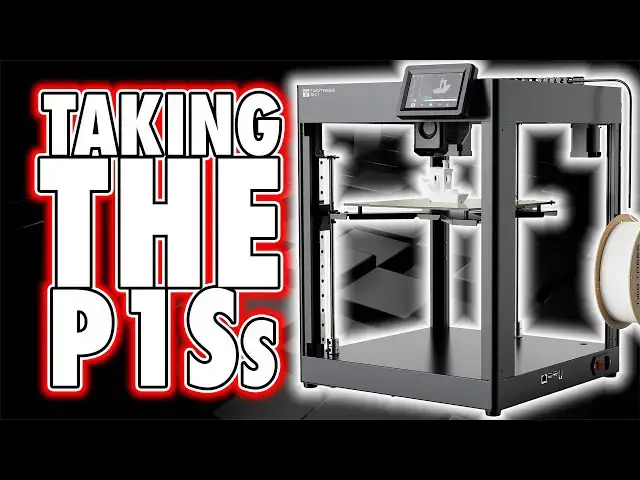
we've got here is a metal framed corxy
0:54
printer and the build volume is 256 mm
0:57
cubed and whilst we've seen printers
0:59
before with various sizes this is the
1:01
first I've seen which is smack on the
1:03
nose of exactly 256 mm if this isn't two
1:07
trees creating a machine as a direct
1:09
response to Bamboo then why 256 why not
1:12
255 or 257 or 260 this matching of
1:16
volume is the first sign that it is
1:18
asking to be compared and whilst the
1:20
framework of this machine comes across
1:22
as well built with everything neatly
1:24
cabled into place inside the body you
1:26
can tell by the numerous screw holes and
1:28
indents within the frame of the chassis
1:30
that the intent is to release an
1:31
enclosure kit later on and further
1:33
evidence for that is that even within
1:35
the UI you've got options for changing
1:37
the speeds of the currently non-existent
1:39
auxiliary and case fans now on this
1:41
machine specifically the unboxing and
1:44
setup was one of the easiest I've ever
1:46
performed it is literally take it out of
1:48
the box and remove the six retaining
1:50
blocks which hold the X and Y mechanics
1:51
in place during shipping then you just
1:53
need to attach the filament reel holder
1:55
the Wi-Fi antenna and the screen which
1:57
Just Clips into a plastic rail that you
1:59
need to to attach to the printer body
2:01
but that's it just plug it in and turn
2:03
it on without the time I spent filming
2:05
and moving my camera around this setup
2:07
must have taken no more than 20 minutes
2:09
from cutting open the box to turning the
2:11
printer on now with any other similar
2:13
printer I've had recently this is the
2:14
part where you would expect an out of
2:16
box experience on the UI where the
2:18
printer walks you through Wi-Fi
2:19
connection and Performing several self-
2:21
calibration steps for things like
2:22
resonance compensation and bed leveling
2:25
but as per the handy note inside the box
2:27
says the printer was already calibrated
2:29
at the factory and yeah in my case it
2:31
was at least to the point I was able to
2:33
print the provided ventry file straight
2:35
from powering on but I'll come back to
2:37
that point later now in my initial notes
2:39
for this review I was slating this
2:42
machine for its lack of outof box
2:43
experience in the UI now as I was
2:45
initially filming this and making my
2:47
review notes I was actually quite cross
2:49
at the printer and the instruction
2:50
manual for its lack of any useful
2:53
information you're probably not
2:55
surprised and it's not the biggest deal
2:56
but yeah the manual is a poorly
2:58
translated five-page Fe showing you how
3:00
to remove the retaining blocks plug in
3:02
the Wi-Fi antenna attach the filament
3:04
spool holder and finally the screen
3:06
module that whole process took me about
3:08
7 Seconds to show you just now and when
3:11
I say poorly translated I mean things
3:12
like the heading of each page which
3:14
should say something like assembly guide
3:16
instead it says the printer assemble or
3:19
on other Pages the machine ass emble and
3:23
I can already hear the negative comments
3:24
towards me and my content being formed
3:26
in the brain of many a viewer but look
3:29
yeah fair enough this kind of crappy
3:31
stuff has little bearing on the printer
3:33
itself but where this machine is so
3:35
obviously trying to emulate the p1p two
3:38
trees like so many other brands have
3:40
failed to grasp that the reason for
3:41
Bamboo's success is because of their
3:43
focus on user experience and what two
3:46
trees have created here kind of further
3:48
proves that point for me because both
3:50
printers are almost identical in terms
3:52
of core Hardware though with this one
3:54
taking several shortcuts in terms of
3:56
Hardware quality like the LED strip
3:59
being no more more than a cheap LED
4:00
strip here to the visible screws on the
4:03
outside of the case or the cheap metal
4:05
build plate I honestly find it funny
4:07
that Tut trees open their manual with a
4:09
letter to a client it's not sure who the
4:11
client is but probably you and this
4:13
letter States we have always been
4:15
customer oriented and contains phrases
4:17
like so that everyone can have a rich
4:20
experience now they may want to actually
4:22
learn what those words mean because the
4:24
first clear downfall of this printer is
4:27
that it is neither a customer oriented
4:29
or Rich experience in fact much of your
4:32
experience is let down by both poor
4:33
translation and or a lack of information
4:36
for the end user and for many potential
4:38
buyers out there I completely understand
4:41
that you'll look at a company and think
4:42
when they put such little effort into
4:44
the small things like making clearly
4:47
translated user guides where else are
4:49
they cutting Corners in the hardware
4:51
itself well I'll get to that but first
4:54
maybe pause the video and have a look at
4:56
the language used in this three question
4:57
FAQ sheet to see if you can understand
5:00
it because it took my brain more than
5:02
one read to figure out its whole intent
5:04
so anyway that was why I wasn't happy
5:06
with the printer at first because I was
5:08
trying to figure out how to calibrate it
5:09
before my first print because that's
5:11
what other printers have trained me to
5:13
do but in reflection I actually think
5:15
this is a better approach in some regard
5:17
the printer was already calibrated which
5:20
means if I knew this before opening the
5:22
box I could have just started printing
5:24
immediately after setup rather than Tred
5:26
to go through unnecessary calibration
5:28
steps however this approach is a
5:30
double-edged sword due to poor well
5:33
actually the complete lack of user
5:35
instruction and I'm sorry to yet again
5:37
drag out a video but I need to explain
5:39
in everyone cuz I don't know which of my
5:41
videos is the first one you've seen as I
5:44
say with every fdm printer review I'm
5:47
not the 3D printer tech guy I use my
5:49
printers as tools to make models and
5:51
props so what I'm after is a printer
5:53
that provides great results with as
5:55
little input on my part as possible
5:58
there are other people out there like me
6:00
I've got no interest in tweaking or
6:02
tinkering any printer to get the most
6:03
out of it as much as I'm typically happy
6:05
with is performing maintenance when or
6:07
if the printer starts to go wrong
6:09
through General wear and tear and there
6:11
will be a load of people out there who
6:13
believe that I like many others
6:15
shouldn't even own a 3D printer without
6:17
being willing to do hours of calibration
6:19
and tweaking but you know what guys I've
6:21
seen enough comments on my other videos
6:23
to know I am far from alone in my wants
6:25
when it comes to these products it's not
6:27
just a handful of people there are
6:29
thousand thousands of you out there who
6:30
are looking for the exact same thing I
6:32
am a printer that works and works well
6:35
so if you're also in that camp what you
6:37
need to know about this printer is that
6:39
whilst in many ways it has much of the
6:40
same feature set as the p1p it won't
6:44
hold your hand at all once you get it
6:46
out of the box and follow that five-page
6:48
guide on setting it up you are
6:49
completely on your own the UI for
6:52
example isn't the worst I've seen but it
6:53
also isn't the most intuitive either and
6:56
just like the instructions it's also
6:57
poorly translated Within in the basic
6:59
function menus the fan tab is sometimes
7:02
called luter which is the German word
7:04
for fan surely that's an easy fix in a
7:06
firmware update but not already spotting
7:08
this before release is lazy qat and when
7:11
you start a print or one of the
7:13
calibration tests you're locked into
7:15
that function with none of the other
7:17
options being accessible yet you still
7:19
get the visible indication of your
7:20
button press when running a calibration
7:22
there's no indication that anything's
7:24
happening during the nozzle heating step
7:26
there's no readout of current temp so
7:28
that you can see that it's getting
7:30
hotter it just says Heating and you need
7:32
to hope that it's actually doing that
7:34
and should you need to perform any of
7:36
the calibration steps good luck guessing
7:38
what the four different icons mean
7:39
because there are no user guides telling
7:41
you what each one does or how to run
7:43
them I suppose we must be at least
7:45
thankful that they are mostly fully
7:48
automated let me show you here the first
7:50
one is Zed tilt which will ensure that
7:52
the bed is level across the three
7:53
independent Zed axxis Motors and I'll
7:55
come back to that shortly the second is
7:57
probe calibrate which I presume is for
7:59
you to manually set the nozzle distance
8:00
from the print plate which is
8:02
essentially the Z offset the third
8:04
option is bed mesh which once again is
8:06
not an intuitive word to me but this
8:08
seems to be leveling calibration and
8:10
finally we have shaper calibrate which
8:12
is a feature we've seen in all printers
8:14
since Clipper became popular and this is
8:16
to compensate for vibrations and I'll
8:18
also come back to that shortly my point
8:20
is there you go two trees it took me 30
8:23
seconds to explain what you didn't even
8:24
bother to and still with the UI Beyond
8:27
those winges some fool decided it was a
8:29
good idea to show file names with
8:30
scrolling text and no print images so
8:33
you need to wait for the text to scroll
8:34
a few times to work out what you're
8:36
reading nobody likes scrolling text two
8:39
trees this is a modern printer not a
8:41
website from
8:42
1997 and finally for some ludicrous
8:45
reason the remaining time on a print
8:47
counts down hours from 99 minutes rather
8:50
than 60 meaning that a print with say 4
8:53
hours and 30 minutes remaining shows us
8:55
3 hours and 90 minutes and you might be
8:58
watching this thinking oh my God why is
8:59
he spending this much time going on and
9:01
on about the UI that's got nothing to do
9:03
with how the printer actually works well
9:06
in my view yes it does and at this price
9:08
point and form factor you can buy a
9:10
printer that doesn't have these issues
9:12
and that generally just makes things
9:14
easier for you so why should I not Point
9:18
them out if these things don't bother
9:19
you go and buy the printer that's fine
9:21
I'm not telling you not to buy it I'm
9:23
just showing you all the things I found
9:25
irritating with it that I don't feel
9:27
like we need to have anymore and now
9:29
that I know we don't need to have these
9:31
minor issues why would I choose to have
9:34
them when I can just as easily choose
9:35
not to with a printer from another brand
9:38
so onto something a little more positive
9:40
this is a bit of a double-edged sword
9:42
because most brands would waste their
9:44
time creating a weaker version of either
9:46
curer or prer slicer two trees have just
9:49
given us both of these bass applications
9:51
on the thumb drive that this printer
9:53
comes with none of this custom crap
9:56
which typically results in a more
9:57
limited slicer with less Comm Community
9:59
Support not even a two trees branded
10:02
version just the raw applications
10:04
themselves and this is good however what
10:08
they fail to do is explain to you how to
10:10
set either of them up further cementing
10:12
this product's place that it's not one
10:14
that's beginner friendly now it's
10:16
relatively simple but it's simple if you
10:18
know how to do it so I chose pra slicer
10:21
as it's the more feature Rich and more
10:23
intuitive product and for your benefit
10:25
the initial setup is simply clicking
10:27
file import import config bundle then
10:30
just select the bundle from the prer
10:32
config folder on the USB drive that
10:34
comes with the printer now this machine
10:36
does have a few things I do like as I
10:37
said but just like my earlier complaints
10:40
this is also just minor functional stuff
10:43
I do like that they opted to put the
10:44
filament re holder on the side of the
10:46
printer too many machines have been
10:48
putting this on the back making it
10:49
harder to access than it needs to be so
10:51
thanks for that two trees and as
10:53
mentioned it's got a cheap built-in LED
10:55
light strip at the front which lights up
10:57
your print from the front rather than
10:59
the side like its direct competitor
11:02
again smart considering I look at prints
11:05
from the front and it has built-in Wi-Fi
11:08
and whilst I'm not a fan of the sticky
11:09
out antenna from an aesthetic point of
11:11
view I'm glad it has it the setup on the
11:14
printer is just a case of going to the
11:16
network menu and connecting to your
11:18
Wi-Fi network then you take the IP
11:20
address and enter it into the printer's
11:22
config screen iner which allows you to
11:24
send and start prints remotely if you
11:27
prefer you can even use the ethernet
11:29
socket and the printer also has two USB
11:31
ports one can be used for the USB drive
11:33
if that's your preferred method of
11:35
getting files onto the printer the other
11:37
can be used for a camera which is useful
11:39
as the printer does not come with one
11:41
built in what I'm not so keen on though
11:43
is the build of the hot end once again
11:46
this has pros and cons for anyone who is
11:49
aware you can see clearly from the image
11:51
on the printer's web page and this video
11:54
here that even shapewise this is all but
11:57
a clone of bamboo p and X series hot
11:59
ends but with the added benefit here
12:02
that you can actually remove the nozzle
12:03
and screw in a new one pretty easily it
12:06
also means they can get the run out
12:08
sensor within the hot end right where it
12:10
should be to avoid wasted filament
12:12
however if you need access to anything
12:14
inside this unit which is a very common
12:16
maintenance activity unlike its
12:18
competitors's unit there's no magnetized
12:20
faser on this one so you will need to
12:22
unscrew a few screws to get access and
12:26
well there's there's more not only do
12:27
you have to take out the for screws you
12:29
also need to remove the big bolt on the
12:31
side I've still got no idea what this is
12:33
for I'm guessing it's an extruder
12:35
tension bolt but again there's no user
12:37
guide that explains this but even when
12:39
you remove that you can't actually pull
12:41
the front faer away because it's trapped
12:43
by both a power cable and the PTFE tube
12:46
a tube you can't remove because the hole
12:48
in the top is too small for fingers and
12:51
there's no provided release tool and
12:53
even if there was two trees saw it
12:55
prudent to put a retaining clip under
12:57
the release latch that you you can't get
12:59
to I genuinely don't have words to
13:02
explain my feelings about this Approach
13:04
at least not in a way that YouTube would
13:06
allow or wouldn't result in me getting
13:08
cancelled they honestly should have sent
13:10
this printer to a poet getting back to
13:12
it these hot-end parts including the
13:14
nozzles are all proprietary so your only
13:17
source of Replacements is two trees now
13:19
I don't mind proprietary nozzles when
13:21
there's a benefit but like many other
13:23
brands that I often refer to as absolute
13:26
crap there are currently no replace
13:29
ments nor other size options available
13:31
for this and finally and back to things
13:33
I do like and yeah it's a small thing
13:36
the Pei plate does have two alignment
13:39
screws on the back so you can easily get
13:41
the sheet in place before slapping it
13:42
down to the magnetized surface it sits
13:44
on and yeah this is only a small thing
13:46
but so many modern Brands don't even
13:48
bother to do this much that it's worth
13:50
praising two trees for the effort now
13:52
when it comes to the print quality I'd
13:54
say this is absolute balls but it's
13:58
probably me I'm not sure how but I
14:00
expect after seeing this many more
14:02
experienced users will tell me that I'm
14:03
doing something wrong now it shocked me
14:06
immediately just how fast this was now I
14:08
say fast but don't pay too much
14:10
attention to the 700 mm a second print
14:12
speed on the website because that's
14:14
movement speed not print speed print
14:16
speed is limited by the Extrusion rate
14:18
of the material you push through it so
14:20
the 16-minute Beni on this printer is no
14:23
faster than any other printer I've
14:24
tested in the last year but with this
14:27
great speed comes great vol volume and
14:29
I'm not sure if it's the rails that this
14:31
hot end runs on but the movement sound
14:33
of the print head reminds me of the were
14:34
from dot matrix printers back in the 80s
14:37
but when printing though using the
14:39
pre-sliced Beni they supplied on the USB
14:41
drive I noticed the door on the side of
14:43
the bench's cabin was clearly warped and
14:46
it was about now that it made sense to
14:48
me that I might need to actually rerun
14:50
the input shaper calibration now all of
14:52
the other pre-calibrated Valu should be
14:54
fine through shipping thanks to it being
14:56
well packed and locked into place but
14:58
I'm sitting this printer on a different
15:00
surface to what two trees would have sat
15:02
it on at their Factory this somewhat
15:04
necessary recalibration is obvious to me
15:06
in hindsight but when I was going
15:08
through the setup I just trusted two
15:10
trees pre-calibration blindly without
15:12
enough thought on my end again if you're
15:15
new to printing how would you even know
15:17
to think about this and another thing I
15:19
noticed when printing my own stuff
15:21
however and yes this is a dumbass
15:23
mistake on my part I started my next
15:26
print remotely before I took the benry
15:28
off the late whoops please feel free to
15:30
add a typical angry YouTube viewer
15:33
comment below like this reviewer's got
15:35
no idea because all the problems and
15:37
mistakes he's made yeah feel free to add
15:39
that comment if you've never made a
15:40
mistake in your life go for it anyway
15:43
the result of my error was that the
15:45
printer just drove the nozzle down into
15:47
the benie so hard that it melted through
15:50
the top and dislodged the whole plate
15:52
out of alignment before I was able to
15:55
dive over and switch the printer off and
15:57
whil yes this bit here was my dumbass
15:59
mistake I have had other printers which
16:02
are clever enough to recognize that the
16:03
print area is not clear and warn me
16:06
before it just pushes its hot nozzle all
16:08
the way down into a part even if not it
16:10
would warn me as it started to connect
16:12
with the part stop the job and warn me
16:15
that there's some kind of obstruction
16:16
due to pressure on the motors but nope
16:19
here your warning is the sound of
16:21
mechanical failure because the plate was
16:23
now out of alignment I hoped that I
16:25
could use the Zed tilt calibration tool
16:27
to realign it but the misalignment was
16:29
so far that the nozzle just scraped into
16:31
the bed and again there was no warning
16:34
and the calibration just ended in a very
16:35
short time with no error so instead I
16:38
had to roughly align it manually by
16:40
turning the motors before running the
16:42
calibration again which ran much longer
16:44
the second go round and that's the only
16:46
indication I had that this time was more
16:49
successful and I then ran all of the
16:51
remaining calibration tests before
16:52
printing another Beni and some models of
16:55
my own and this here is some war game
16:57
scenery from the guys at War scenery.
16:59
comom I actually met these guys at lvo
17:01
as they were in the booth next 2 hours
17:03
and I really like the scenery they make
17:04
there's no sponsorship here they haven't
17:06
paid me I just like the files and asked
17:08
for them so I could show them off now
17:10
I'm a huge fan of Warhammer and video
17:12
games so this stronghold building really
17:14
is something that I just love and ticks
17:16
both of those boxes and 10 internet
17:19
points goes to anyone out there who can
17:21
tell me what video game inspired this
17:23
now whilst this was printing I noticed
17:25
some undere Extrusion causing gaps in
17:27
the infill I didn't expect this
17:29
considering I'm using two trees filament
17:31
and their printing profile also when I
17:33
printed the first part I noticed some
17:36
terrible wobbles and ghosting up the
17:38
whole piece so before printing the back
17:40
part of this model I ran the input
17:41
shaper calibration again but the back
17:44
part also has very clear wobbles in it
17:46
what's odd that these wobbles lined up
17:48
perfectly with the front part suggesting
17:50
this is how the printer has somehow
17:52
interpreted it should be printing these
17:54
parts and as I said before it also did
17:56
this with the Beni which was slic by two
17:58
trees however they did it and again in
18:01
the parts that I sliced myself so it's
18:03
not a problem in the slicing or the
18:05
slicer it's something from the printer
18:07
itself I know that much and I'm sure
18:09
there's somebody out there watching
18:11
probably screaming that's obvious you
18:13
just need to tighten the widget flange
18:14
while Saturn is in retrograde and then
18:16
it'll print perfectly but from all the
18:18
Googling I've done and the other
18:19
creators I've spoken to I'm consistently
18:22
told that this is an input shaper thing
18:24
well as I said I've run the only
18:26
calibration available a bunch of times
18:28
it's mostly unattended so I have no idea
18:30
what else I can do it's also sat on the
18:32
exact same surface that all of my other
18:35
printers have been tested on and they
18:36
were all fine so forgive me I'm going to
18:39
wait until a profile for the printer is
18:40
available in Orca slicer before I even
18:42
bother with trying to fix it instead I
18:45
printed this same model on my p1p using
18:47
the cheapest pla filament I could find
18:49
from eligo and using outof boox settings
18:52
and I was able to get this sharp and
18:53
detailed result and yeah look I do feel
18:56
bad by turning this review of the SK K1
18:58
into a you should probably get a p1p
19:01
instead video but sorry Tut trees you
19:03
invited this by creating a poorer
19:05
quality clone and having the audacity to
19:07
charge the same price for it in
19:10
conclusion there's some stuff to like
19:11
about this printer but like many of its
19:13
features the whole thing appears to me
19:15
like a very sharp knife with no handle
19:17
it'll cut as it was designed to but
19:20
unless you're prepared to do a little
19:21
makeshift work to yourself then it'll
19:23
cut you just as easily as anything else
19:25
and it's a bit blunt I think it's
19:27
obvious that this is so desperately
19:29
trying to be an option for those people
19:31
who want to get something exactly like a
19:33
p1p but for whatever reason just don't
19:35
agree with or want to invest in Bamboo's
19:38
more lockedown ecosystem now obviously
19:40
Bamboo's approach is one I personally
19:43
prefer but even I have to reiterate
19:45
nothing has ever suggested my opinion is
19:48
right for everyone even to the negative
19:50
commenters out there who are poised to
19:52
put a horrible comment on this video I
19:54
Know Who I Am guys I'm little more than
19:56
a person that most of my viewers watch
19:58
whilst they're sat on the toilet but I'm
20:00
also a guy who wants a printer to be
20:01
more like a modern SLA camera I want it
20:04
to give me half decent results out of
20:06
the box and have the option to tweak
20:08
options and settings to potentially get
20:10
better results in the few small hours I
20:12
have spare each week to try something
20:13
new but I want to always have the option
20:16
to go back to default mode when I want
20:17
to just get something printed now or
20:20
when I've ballsed up the settings trying
20:22
to make things better and it should be
20:24
okay to say I don't want to learn a
20:26
whole new hobby just to make a half
20:28
decent or even quar a decent building
20:30
for my Space Marines to stand next to on
20:32
my shelf and I expect most of my typical
20:35
audience are of the same opinion but if
20:37
you do then what you get here is the
20:39
closest thing we've seen yet to a bamboo
20:41
p1p but with Clipper open to you out of
20:44
the box but this is also a poorer
20:47
quality version too in terms of its
20:49
build I'm sure many people out there
20:51
will want this printer will buy this
20:52
printer and love this printer all I'm
20:55
saying with this review is I think two
20:57
trees could have won over much more of
20:59
the Everyman printer crowd if they'
21:01
bothered with some more basic stuff like
21:04
translation user guides made key spares
21:07
available from the get-go and directly
21:09
integrated with things like Orca slicer
21:11
out of the box and I mean directly
21:14
integrated not leave you to set it up
21:16
yourself with no instructions on how to
21:18
do it but they didn't which to the
21:20
consumer is either lazy daed or
21:24
intentional and I don't know which of
21:26
these would be the better excuse
21:28
I hope my video has at least shown you
21:30
what this is so you can properly
21:32
consider it amongst your buying choices
21:34
and if you do intend buying it please
21:36
click our links in the descriptions
21:37
before you do I want to say thanks to
21:39
our members for continuing to support us
21:41
they do get early access to all of our
21:43
content and more I'd like to thank you
21:45
for watching and if this video was
21:47
helpful in any way positively or
21:49
negatively please hit like and drop me a
21:52
comment until next time life is like a
21:54
box of chocolates faux hammer out
22:02
[Music]