0:00
I've seen a lot of buzz about Comm
0:01
Mark's OmniX lately, and I've been dying
0:04
to get my hands on one. I've reviewed a
0:06
fair few lasers now, but this one, this
0:08
one's been a proper head scratcher.
0:10
Everything about it feels like it's
0:11
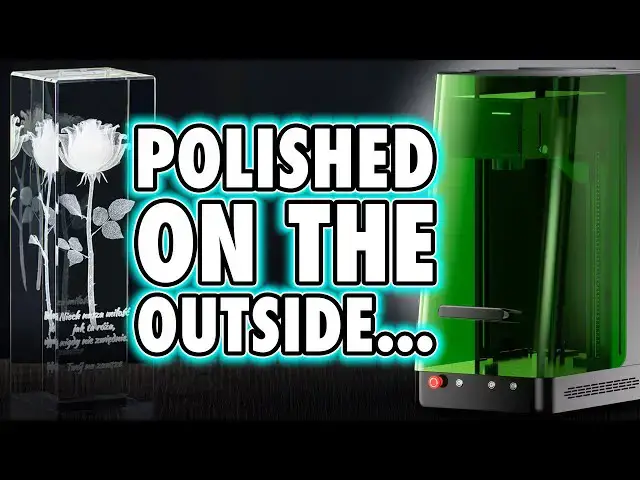
arguing with itself. Professional and
0:14
polished on the outside, but
0:15
occasionally questionable underneath.
0:17
It's a mix of brilliance and bull in
0:19
roughly equal measure. But overall, it's
0:22
still one of the most capable and
0:24
versatile lasers I've used, which makes
0:26
this all the more confusing. And why?
0:29
And should you buy it? That's entirely
0:31
up to you. Not me. My job is just to
0:33
show you the truth of what this thing
0:35
actually is so you can make an informed
0:37
decision, not the glossy one that the
0:39
marketing team wants you to see. Hi, I'm
0:42
Ross and this is Fammer Videos. Now,
0:44
I've said many times, first impressions
0:46
count, and this thing doesn't so much
0:48
arrive as make an entrance. The
0:50
excessively large box came on a pallet,
0:52
and I had to drag it into the workshop
0:54
like I was hauling treasure from a
0:56
shipwreck. Everything inside was
0:58
individually boxed, wrapped, and
1:00
sandwiched in foam like high-end
1:01
military equipment. Honestly, it was
1:04
impressive right from the start. But
1:06
then I started building it. Now, unlike
1:08
most lasers that turn up ready to go,
1:10
this one wants you to earn it. The
1:13
process is simple enough on paper, but
1:15
in practice, it's like assembling IKEA
1:17
furniture designed by someone with a
1:19
personal grudge against organization.
1:21
com marker have labeled the boxes
1:24
beautifully but then forgot to label the
1:26
screw sizes and with a pile of nearly
1:28
identical bolts I ended up needing to
1:30
use a 3D printed measuring chart like
1:32
some sort of forensic engineer. There is
1:34
a video guide online and that's
1:36
marginally more helpful than the manual,
1:38
but neither mentions a few things such
1:40
as several of the machine parts here
1:42
have, let's say, creative tolerances.
1:46
After fixing the Z-axis bracket and
1:48
mounting to the laser head and then
1:49
cabling up the wiring loom, no problem
1:52
there. When trying to fit the outer
1:54
chassis, few of the holes actually lined
1:56
up with anything resembling a thread.
1:59
Holding the panel in place while
2:00
wrestling 12 screws into submission took
2:03
over an hour and a measurable chunk of
2:05
my patience. And the push-in handles
2:07
were where it got worse. I could only
2:09
actually get one in no matter what I
2:11
tried. And judging by the comments on
2:13
Comm Marker's own website, this
2:15
frustration is shared with many others.
2:18
Now, before fitting the lid and handle,
2:19
they recommend connecting the power and
2:21
motion cables, which like the rest are
2:23
at least neatly labeled on both the
2:25
cable and the socket. the rare moment of
2:28
logic in an otherwise maddening build.
2:31
Now, around the back there's an
2:32
extraction port with two options, a
2:34
flexible plug or an exhaust adapter.
2:36
Now, since Commarker sent me their
2:38
extractor, we'll get onto that fiasco
2:40
later, I fitted the hose adapter. And
2:43
then came the lid, the handle, and
2:45
finally the lighting solution. An LED
2:48
ring light held on with double-sided
2:50
tape. And nothing says industrial
2:52
precision like a lighting system that
2:54
could have been bought from Poundland.
2:56
Uh, that's the British version of Dollar
2:58
Tree, guys. Anyway, by the time it was
3:00
fully assembled, that shiny, high-end
3:02
first impression had started to fade.
3:05
Now, built up, the OmniX looks
3:07
professional, heavy, sturdy, and
3:09
serious. But that image falls apart the
3:12
moment you look closer. There's a nest
3:14
of cables hanging out the back rather
3:16
than being neatly integrated into the
3:18
machine, panels that don't quite align,
3:20
and daylight streaming through numerous
3:22
gaps. Add in the missing handle, open
3:24
ports, and the generous gap between the
3:26
base and safety door, and it's a great
3:29
setup if you like fumes and stray UV
3:31
light. Now, coming back to that stick on
3:33
LED light I mentioned earlier, this by
3:36
default is so bright, it actually makes
3:38
the alignment preview laser more
3:40
invisible, which is a special kind of
3:42
engineering magic. I unplugged it after
3:44
only three uses to stop my retinas from
3:47
waving a white flag. Now, functionally,
3:49
the OmniX gives you plenty of ports,
3:52
though most are already occupied by the
3:53
internal components. There are some
3:55
spares because Com Maker also sells a
3:58
rotary tool and conveyor add-on, neither
4:00
of which were sent for me to test, but
4:02
they are available. The power socket
4:05
sits at the rear, while the main
4:06
controls are on front. You get three
4:08
buttons. One is for power, the other two
4:10
move the laser head up and down the Z
4:12
axis. There's also an emergency stop
4:15
that genuinely cuts power, and that's
4:17
good. Now, when powered on, the
4:19
machine's fan runs constantly at around
4:22
70 dB, even when it's idle, like it's
4:24
desperate to remind you it exists at all
4:26
times. Connectivity comes via a USB 3.0
4:30
typeB port and supposedly Wi-Fi, though
4:32
I couldn't get the latter working or
4:34
even find a clear way how to set it up.
4:36
I did ask com Maker how to set this up,
4:38
but I had no reply to that question,
4:41
among some others. Inside, the standard
4:43
configuration includes a 70 mm lens with
4:46
a 7x7 cm work area. Swap to the included
4:50
150 mm B lens, and that doubles to 15x
4:53
15 cm. And it's almost ironic that a
4:55
machine with a base this large only
4:58
engraves an area the size of a beer mat.
5:00
And that engraving area isn't even
5:02
central on the base since the head sits
5:04
to the left of its arm. Now, my unit is
5:07
the 6W version. There's also a 12 W
5:09
model at nearly twice the price, which
5:11
includes a 250 mm lens rather than the
5:15
150. Doesn't include all three. I I
5:18
don't know why. Anyway, changing lenses
5:20
is easy. Just unscrew one and fit the
5:22
other. But whilst Comm marker provides
5:24
front lens covers, there's actually
5:26
nothing for the rear of your secondary
5:28
lens. So, your spare lens sits exposed
5:31
collecting dust at all times. Now, at
5:33
least the safety side looks considered.
5:35
The glass cover is marked as OD5+ on the
5:38
website and the included goggles do say
5:41
OD6 Plus and CE markings. And whilst
5:45
people will be out there going, "Yeah,
5:46
they could make those up." Yeah, they
5:48
could, but faking those would be legally
5:50
suicidal. So, I'll assume they're
5:52
genuine. Still, with the number of gaps
5:54
around the frame, I'm genuinely not sure
5:56
who looked at this and said, "Class one
5:58
laser. Yeah, that's fine. Approved.
6:00
Tick." Okay. But anyway, as always, I
6:04
use my own safety glasses because they
6:06
fully cover my current spectacles. And
6:08
I've got a separate video on that and
6:10
other laser safety things that you
6:12
should be aware of if you're new to
6:13
them. And I recommend you check that out
6:15
if you're new to this technology. Moving
6:17
on, on the side of the head, there's an
6:19
adjustable autofocus beam. I asked Comm
6:22
Marker why it's adjustable, and again,
6:24
no answer. So, I left it set to the
6:26
lowest position, and well, it worked
6:28
perfectly throughout all my testing. So,
6:30
unless you enjoy making life harder,
6:33
that's where it's going to stay. But if
6:34
you can understand why you would want to
6:36
inaccurately adjust this, please let me
6:39
know in the comments. Anyway, before
6:41
getting on to the actual engraving, the
6:42
software deserves a mention and then
6:45
some. Mostly because it's a bit of a
6:48
mess. Comark provides some basic project
6:50
guides, but nothing to explain how to
6:53
actually operate the machine or the
6:55
software itself. They've got a how to
6:57
build the machine video. And then
6:59
they've got a few demo engravings, but
7:02
nothing that bridges the gap between
7:03
unboxing and understanding. And the
7:06
software isn't unusable, but it is
7:09
clunky. It's not actually Commarker's
7:11
software. It's a third party software
7:13
that I've seen other laser brands use,
7:15
and Com Marker are having the creator of
7:17
this software tailor it to their needs.
7:20
So, you can feel that disconnect there
7:23
because the layout feels random.
7:25
translations are rough and a few
7:26
interface elements glitch or overlap
7:29
when just resizing the window. It does
7:31
come with some preset profiles included
7:34
for different materials, which sounds
7:36
helpful until you realize there's only
7:38
one option for each type, such as wood,
7:41
metal, and so on, with no breakdown of
7:43
which wood or what metal, or what power
7:45
levels those settings are actually meant
7:47
for. If you want consistent results,
7:49
you're still going to need to run your
7:51
own tests. And com marker Studio is also
7:53
very basic in its approach. There's no
7:56
visual guides, no previews of what an
7:58
engraving will look like when you choose
8:00
a certain setting. There's no gradients
8:02
to help you understand how your setting
8:04
might translate to the final result.
8:06
Just a written list of materials and
8:08
parameters. It works, but it feels
8:10
incredibly unfinished. However, this
8:13
machine is also compatible with
8:15
LightBurn, which I think many
8:17
experienced users already rely on.
8:19
Anyway, LightBurn itself is powerful but
8:22
dated visually. It does the job though.
8:25
It just still relies heavily on you
8:27
doing tests and then manually
8:29
calibrating things. But com marker
8:31
Studio does include one genuinely unique
8:34
feature which you're going to need to
8:36
use because it isn't currently available
8:38
in LightBurn. This is where you engrave
8:41
inside crystal or or glass. And that is
8:44
a proper UV laser trick. And to be fair,
8:47
it works. Load a 3D model, set your
8:49
crystal size, and hit go. Simple enough
8:52
once you found the right menu. Now,
8:54
coming back to something I mentioned
8:55
earlier, Com Marker also sent me their
8:57
smoke extractor. The packaging was
8:59
nowhere near as careful as the main
9:01
unit. In fact, and sorry I didn't video
9:03
this, this unit was just thrown in a
9:06
random box with what looked like some
9:07
spare padding foam they had laying
9:09
around. The result is that this arrived
9:11
with the corner smashed. And yeah, I
9:13
know I got it as a freebie, but again,
9:16
just this shows me the level of care
9:18
they put into things or or don't.
9:20
Anyway, this is a standard small filter,
9:23
big fan, layered filters, a power
9:25
switch, and a dial to control the
9:26
suction power. Unfortunately, the hose
9:29
they supplied didn't fit the extractor
9:31
or the laser, which completely nullifies
9:34
its usefulness. And look, guys, I know I
9:36
can fix this with a flexi hose easy
9:38
enough, but I'm here to show things as
9:40
they come. And honestly, this is
9:43
embarrassing, right? Then the important
9:45
part, actually using the Omniax. Now,
9:47
using it has been a mix of frustration
9:49
and fascination. What makes this laser
9:51
stand out is its versatility. The UV
9:54
light source can mark and cut softer
9:56
materials like paper, felt, wood, and
9:58
even stone. But it also marks metals,
10:00
stainless steel included, without
10:02
needing special coatings. That
10:04
flexibility alone puts it in a different
10:06
class to most machines with a diode and
10:09
UV combo. But the real showpiece though
10:12
is what it can do with transparent
10:13
materials. It can mark directly on or
10:17
even inside acrylic, crystal, and glass.
10:20
And that has been on my want to try list
10:22
for ages. I loved the idea of creating
10:26
those laser edge crystal blocks. Well,
10:28
at least I did right up until I went on
10:30
holiday and took a closer look at what
10:32
they had stacked on souvenir shelves.
10:35
And these were selling in their engraved
10:37
state for less than what I can buy the
10:39
raw blanks for. Still, where the real
10:42
potential is, I think, lies in the
10:44
customization of these materials.
10:46
Etching bespoke art or logos into those
10:48
blocks makes sense commercially. And for
10:51
hobbyists, it's just fun. I actually
10:53
dropped the artillery witch from Trench
10:55
Crusade inside one of the crystal cubes
10:57
purely because I could, and it came out
11:00
beautifully. And I also etched my faux
11:02
hammer logo into the base of some home
11:04
glassear. And then just to show off,
11:07
etched the same logo inside the base of
11:10
the glass itself. But to do that, it was
11:12
a bit manual because I just lowered the
11:14
laser a few millimeters from its
11:16
autofocus location. And the UV beam's
11:19
precision also let me depth a design
11:21
into stone that I found in the garden.
11:23
And it's got a few spikes here because
11:25
there was dust up on the lens. But
11:27
anyway, other than that, it handled it
11:29
fine. though com marker software can't
11:32
use depth maps. It only works with full
11:34
3D model files, STL files, and that is a
11:38
limitation worth knowing because you're
11:40
going to need to use LightBurn for depth
11:42
maps, which for depth engraving is what
11:44
I think most people are using. Where
11:47
this struggles though is metal depth
11:49
engraving. I did try to engrave a coin
11:51
design in layers, and I gave up at just
11:54
over 200 passes, and that was about 5
11:56
hours into the job. Now, the design
11:58
looked fine initially, but one quick
12:00
polish and most of it vanished. There is
12:03
some depth, but not enough. It's just
12:05
surface marking. It can be done, but
12:08
more testing and patience is needed. And
12:10
this just isn't as powerful as an
12:12
infrared fiber laser. The strongest
12:14
feature of this machine is the
12:16
autoleveling system, which uses a
12:18
secondary laser on the right side of the
12:20
marking area to detect material height.
12:22
Now, when it works, it's quick and
12:24
accurate, but it only works if the head
12:26
starts within its detectable range. If
12:29
you try to auto level when the laser
12:31
head is too high or too low, it won't
12:34
automatically correct, and then you have
12:36
to go to the machine, manually jog the
12:38
head up and down a bit, hope you've
12:39
brought it close enough, and then go
12:41
back to your computer to hit autofocus
12:43
again. It is a good system. It's
12:45
sometimes just a bit more manual than
12:47
the word auto suggests. Now,
12:50
unfortunately, the same can't be said
12:51
for the alignment setup because there's
12:53
no preview camera, and that makes
12:55
placement harder than it should be. And
12:58
because the preview laser is also UV,
13:01
it's completely invisible on most
13:03
materials. And to get around that, com
13:05
marker includes an acrylic preview
13:07
handle, which does help, but because
13:10
it's so thick, there's a small offset
13:12
between where the guide laser appears
13:14
and where it actually engraves onto your
13:16
stock. So the result was most of my
13:19
tests on this were completely offset
13:21
from where they should be. Now the other
13:23
thing I need to mention is the lid also
13:25
doesn't lift high enough to actually see
13:28
the work area properly from above. In
13:30
fact, it's almost the perfect visual
13:33
metaphor because this is me repeatedly
13:35
smashing my head against it trying to
13:37
get into a position where I could
13:39
roughly see what it was going to mark.
13:41
With the included kit, you're basically
13:43
guessing alignment angles like you're
13:45
playing a very expensive round of
13:47
battleship. And as I said, the result
13:49
was most of my test engravings landed
13:52
slightly offtarget as a result. So,
13:54
conclusion time. I think everything I
13:57
said in the intro still stands. The Omni
13:59
X is a fascinating machine that manages
14:02
to impress and irritate in equal
14:04
measure. Most of the excitement comes
14:06
from it being my first proper UV laser.
14:09
And the technology itself is genuinely
14:11
interesting, and the range of materials
14:13
it can handle is impressive. Com Mark
14:16
makes this look and feel like a
14:18
professional-grade tool. And in terms of
14:20
build, weight, and finish, it certainly
14:23
passes the glance test. But once you
14:26
start using it, the veneer wears thin
14:28
fast. The design and usability issues
14:31
pile up and you start to realize the
14:33
engineering effort went mostly into
14:35
appearance rather than refinement.
14:37
Judged purely on its own, the OmniX is
14:40
powerful, precise, sturdy, and genuinely
14:43
capable of excellent results once you've
14:45
got it figured out. It's not
14:47
plug-and-play, and it's not trying to
14:49
be. This is a tool for people who
14:51
already understand lasers. People who
14:54
know or are willing to learn LightBurn.
14:56
Those who have spent or are willing to
14:58
spend the hours learning workflows,
15:00
building jigs, tweaking layers, and
15:02
don't mind when a quick job turns into
15:04
an experimental afternoon. For them,
15:07
this machine can absolutely shine. It's
15:10
built like a tank. It's got range. It
15:12
can handle materials most systems
15:14
wouldn't dare touch. But again, that's
15:16
more because it is a UV laser, not so
15:20
much because of how it's a UV laser. For
15:23
newcomers, this experience demands
15:25
commitment. The workflow, the setup, and
15:27
the software all take patience to learn
15:30
and time to master. It's a system that
15:32
rewards people who already have the
15:34
skill and expects everyone else to earn
15:37
it. That doesn't make it bad. It makes
15:39
it specific. It's a serious tool for
15:41
serious users. And if that's you, you'll
15:44
appreciate what it can do. But if you're
15:46
after refinement, ease, or anything
15:48
remotely userfriendly, this one will
15:50
test your patience long before it shows
15:53
its potential. As always, if you do plan
15:55
on picking one up and this video helped
15:57
open your eyes to what you're buying,
15:59
I'd appreciate you using the affiliate
16:01
links in the description below before
16:03
making a purchase. That's how I can
16:05
afford to run the channel. I want to
16:07
thank you for watching with a huge thank
16:08
you as always to our channel members
16:10
whose names are on screen now. You keep
16:13
the lights on, the machines fed, and the
16:15
sarcasm flowing. If you are new here,
16:17
please consider joining as a member to
16:19
get early access, exclusive videos,
16:21
Discord rolls, and your name in the
16:22
credits. Until next time, I love you.
16:26
I'm trying something new in my outros
16:27
because I've run out of movie quotes.