Up next in 10



🔗 Check out the Flashforge AD5X Here: https://flashforge.sjv.io/dOMnyM
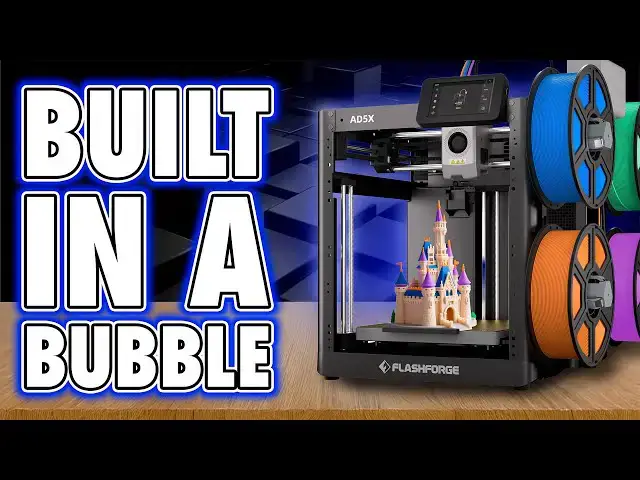
If you’ve ever looked at a Flashforge printer and thought it felt a little… stuck in the past, you’re not alone. My last experience with their machines was like using a VHS player in the age of streaming. But the new Flashforge Adventurer AD5X? Surprisingly solid. Reliable prints, easy setup, automatic bed leveling, and a decent multi-colour system that—while wasteful like every filament-changer—actually works.
In this review I’ll take you through setup, print quality, slicer quirks, Flashforge’s “print your own enclosure kit” logic, and why this machine feels like it was built in a bubble… but still manages to deliver good results. If you’re hunting for a dependable mid-tier FDM 3D printer for cosplay props, tabletop terrain, or everyday hobby projects, the AD5X might just be the printer you weren’t expecting to like.
🔥 Want a multi-color FDM 3D printer that doesn’t drive you insane?
💥 Looking for a reliable Flashforge printer in 2025? The AD5X could be it.
🧵 Covered in this video:
-Flashforge AD5X unboxing & setup
-Build volume, PEI bed, auto-leveling & hotend design
-Multi-color printing with filament changers
-The “print your own” enclosure kit (yes, really)
-Print quality examples: from simple logos to multi-colour Borderlands masks
-Who the AD5X is actually for in today’s 3D printing market
👇 Got questions about Flashforge printers or thinking about upgrading? Drop them in the comments!
Show More Show Less View Video Transcript
0:00
Last time I reviewed a Flash Forge
0:01
machine, it seemed like it was designed
0:03
by someone who'd never actually lifted
0:05
their head to look at the modern world
0:07
of 3D printing. It technically
0:09
functioned, but only in the same way
0:10
your nan's VHS still technically
0:13
functions, whilst everyone else is
0:15
watching DVDs or streaming content. It's
0:18
one of those experiences where you find
0:19
yourself halfway through a print before
0:21
wondering whether the machine was built
0:23
before or after they discovered the
0:24
concept of firmware updates. Everything
0:27
about it felt like it was made in a
0:28
vacuum and not the good kind. As if the
0:31
development team had been kept
0:32
underground since 2014 and were just now
0:35
learning that other printers exist. Back
0:37
then, they wouldn't have recognized a
0:38
modern workflow if it dragged itself
0:40
across their PEI sheet. So, when Flash
0:43
Forge sent me the AD5X, I genuinely
0:45
thought, "Here we go again. Let's see
0:47
what fresh nonsense awaits." And
0:49
honestly, I've been thrown off because
0:52
this machine actually works well. as in
0:55
I've had it for a few weeks now and it
0:56
hasn't once made me want to throw it
0:58
through a wall and that in itself is
1:01
more surprising than most of the things
1:03
I've printed this year. Hi, I'm Ross and
1:05
this is Far Hammer Videos. Now, this is
1:07
a brief one. I'll put about as much
1:09
effort in as Flash Forge did. Talking
1:11
about setup, this thing arrives mostly
1:13
preassembled, but really that's because
1:15
it's just a frame. Unclamp the LCD and
1:18
slide it into its mounting socket.
1:20
Attach the filament feeder arm to the
1:22
right hand side and then push and twist
1:24
the feeder itself to lock it into place.
1:27
Attach the four spring-loaded filament
1:28
winders on the same side, all of which
1:30
are numbered. Connect up the four PTFE
1:32
tubes and the hub in the top of the
1:34
hotend and then plug in the power cable.
1:36
This is in the back. Switch it on, let
1:38
it do its own self checks, and
1:40
setupwise, there you are. You're done.
1:43
It's basic. It's solid. Now, in terms of
1:45
specs, this is a 220x 220x 220 mm build
1:50
volume, so it's your standard cube, but
1:52
it is on the smaller side of modern Core
1:54
XY printers. The bed is a spring steel
1:57
PEI sheet that just works, something I
1:59
actually struggled with on my last Flash
2:01
Forge machine that still needed to use
2:03
glue. It slides into place easily, and
2:05
I'm a big fan of the plastic grip on the
2:07
front, as small of an enhancement that
2:09
that actually is. All the leveling is
2:11
automatic, which again, solid modern
2:14
feature. The hot end's a bit odd,
2:16
though. The nozzle is held in with a
2:18
magnetic bracket, which is great for
2:19
quick swap, and you simply need to
2:21
unlatch it and pull it away. But it was
2:24
also interesting to see that the heat
2:26
sink actually unfolds. Now, I haven't
2:29
actually experienced an extruder jam on
2:31
this, and I've done a lot of filament
2:33
swaps, but watching the online videos,
2:35
it doesn't look like it's the easiest
2:37
job to access the extruder gear
2:39
mechanism if you do face an issue in
2:41
there. Mounting filament is a case of
2:43
pressing it onto the pegs on the right
2:45
hand side and partially feeding it into
2:47
the automated feeder. From here, that
2:49
will then grab it and take care of
2:51
everything else, prepping it, ready to
2:53
be fed on demand. Just be aware though
2:55
that only spools with an inner diameter
2:57
of 52 to 58 mm will fit on these prongs.
3:01
Now, thankfully, more brands seem to be
3:03
adopting this as a standard because of
3:05
all the filament I have lying around, I
3:08
wasn't actually able to find one that
3:10
didn't fit. Now, overall, I like
3:12
automated filament feeders, but I would
3:14
prefer at least the option of something
3:16
more enclosed, which it doesn't seem
3:18
like Flash Forge have. Now, then let's
3:21
talk connectivity. All of the IO, all of
3:23
the main elements are sensibly on the
3:25
back, including the power and rocker
3:28
switch. And I assume, like many print
3:30
farms, I'm happy to see this actually
3:32
has an Ethernet socket. And you also
3:34
have Wi-Fi as an option, too, to connect
3:36
to your local network. Now, let's
3:39
address the control screen. It's fine.
3:41
It's functional. It's got a USB port on
3:44
the side, but it's resistive, not
3:46
capacitive, which means instead of
3:47
tapping, you're pressing firmly. And
3:50
even then, sometimes it responds,
3:52
sometimes it doesn't. Sometimes it jumps
3:54
back to the home screen just to remind
3:56
you who's in charge. Overall, I did find
3:58
it a little frustrating when I've got
4:00
other cheaper machines that are
4:03
capacitive and much easier to press.
4:05
Now, menu layout is simple. It's easy to
4:07
find what you're after cuz there's not
4:09
much here. It's nothing flashy. It's
4:12
clearly using the same skin as every
4:13
other modern printer. It works. There's
4:16
just no innovation or advancement here
4:18
either. And when loading filament, you
4:20
can select both the color and material
4:22
type in each slot in order to sync that
4:24
back to the slicer. But speaking of
4:26
legacy, there's also no camera, not
4:29
installed as standard. Anyway, this is
4:31
an extra and you'll need to buy it if
4:33
you want remote monitoring. Yep, that
4:35
makes sense for those of you who want to
4:37
avoid the extra cost of a machine if you
4:39
won't use this function. I'm just not
4:41
sure the price of this machine reflects
4:44
that of a more budget friendly device in
4:47
the first place, at least at the time of
4:49
recording this video. Anyway, please
4:51
don't have a go at me months from now
4:52
when you find this in a sale. But here's
4:54
the funny thing. Flash Forge also sells
4:58
an enclosure kit, which is great, right?
5:00
Well, no, because that kit only includes
5:03
the clear acrylic panels and nothing
5:06
else. You actually have to print all the
5:08
frame and mounting brackets yourself.
5:10
So, the enclosure kit actually wants you
5:12
to print your own parts, which again,
5:14
it's good for keeping the cost down, but
5:16
ideally you'd want to print this in
5:18
something like ABS, which in case you're
5:20
not familiar with Irony, is one of the
5:22
main filaments that actually benefits
5:24
from an enclosure in the first place.
5:26
So, in order to print this reliably, you
5:29
probably actually already want a printer
5:30
with an enclosure. I'd expect you'd want
5:33
to print an enclosure in a more
5:34
heatresistant material like ABS, but in
5:37
order to print ABS, well, you really
5:40
need a printer with an enclosure. Sure,
5:42
yeah, you could print it in PET G or
5:44
PLA, but the result will be a machine
5:46
that does little more than prevent the
5:48
average breeze from affecting your ABS
5:50
print rather than actually having a
5:52
chamber which controls the environment
5:54
properly to print materials like ABS.
5:57
Yeah, are you with me? It's a bit of a
5:58
catch 22. It's genuinely one of the more
6:01
eastern printer brand things I've ever
6:04
seen. It's perfectly circular logic. But
6:07
honestly, in day-to-day use, this is
6:10
where the AD5X surprised me because it's
6:13
been decent. Reassuringly decent in my
6:16
experience. Once a print starts, it just
6:18
runs. No drama, no skip steps, no sudden
6:21
mystery errors at 92%. Print quality is
6:24
solid. PLA prints come out smooth.
6:26
Bridging is clean. Supports snap off
6:28
easily. Overhangs are handled nicely.
6:30
Bottom layers are crisp. My first layer
6:33
printing test was solid with only some
6:35
slight bubbling in one corner. My first
6:38
actual test print on this, which was
6:40
their logo as a test print built onto
6:42
the printer, had one of the smoothest
6:44
top layers I've ever seen. So, I dove
6:47
straight in and printed a multiolor
6:49
Borderlands mask. And I've got to be
6:51
honest, it looks incredible. It's really
6:53
good quality. But the reason I wanted to
6:55
print this specifically is as a perfect
6:58
example of why I've been avoiding
7:00
multiolor prints on filament changer
7:02
machines. I know I roughly talk about it
7:04
but then avoid doing it because of the
7:07
waste here for this one mask. I've got
7:10
an entire tub. Then there's the purge
7:12
time. This whole print took almost two
7:15
days now. Yeah, you can reduce this
7:17
waste volume and time by reducing the
7:19
amount of material purging it does in
7:21
the slicer or by purging into infill
7:23
too, but because this was a mostly white
7:26
print, I wanted to avoid any chance of
7:28
crosscontamination. And this bin is the
7:30
result. It's not a criticism of Flash
7:33
Forge. Don't hold it against this
7:34
printer. It's just how multicolor FDM
7:38
with filament changes work. And I don't
7:40
think I'm the only one who's kind of
7:42
gone, yeah, we love multiolor prints,
7:45
but because of this waste, so many of us
7:48
would rather just print individual
7:50
elements in their respective colors and
7:52
glue them together afterwards. Am I
7:54
alone on this? Because it feels like
7:57
that's the next advancement in 3D
7:59
printing. This type of filament changing
8:01
seems to be steadily going the way of 3D
8:04
TVs. You just can't buy them anymore.
8:07
But quickly covering the slicer. Out of
8:09
the box, this uses Flash Forge's own
8:11
version of Orca Slicer, but you can just
8:14
use base Orca slicer, which to be honest
8:16
makes more sense to me because it's got
8:18
all the latest Orca updates in it rather
8:21
than being a Flash Forge derivative
8:23
where we get updates when Flash Forge
8:25
get time to integrate them. We may as
8:28
well just use Orca. But finally, and
8:30
just an aside, I wanted to show
8:32
something else off cool that I got my
8:33
hands on. Hand Boost sent me their C1,
8:36
which is basically an ultrasonic cutter.
8:39
Now, I actually thought this didn't work
8:40
at first because I couldn't see the
8:42
blade vibrating when it was turned on,
8:44
but it was only after touching it to
8:45
bare plastic you can hear this subtle
8:48
high-pitch squeal as it effortly just
8:50
slices through like a hot knife through
8:52
butter. Now, they wanted me to give my
8:54
opinions on this. I'll be honest, it's a
8:56
little heavy due to the battery and
8:58
mechanics, which well, it stops it being
9:00
super comfortable to hold. And yeah,
9:03
it's a little bit unwieldy, but once you
9:05
get used to it, it is incredibly handy
9:07
to have. Probably as handy as it is
9:10
dangerous. So yeah, if you grab one, be
9:13
careful when using it. I'll put a link
9:14
in the description, but I absolutely
9:17
love mine. But yeah, final thoughts on
9:19
the machine. There's not really much
9:20
here. The Flash Forger Adventurer AD5X
9:23
is a great machine, but it seems built
9:25
by a company that still behaves like
9:27
it's the only company making 3D
9:29
printers. They're just blind to what the
9:31
competition are doing in terms of
9:33
features and price. It is like it was
9:35
designed in a bubble. One where other
9:37
brands doing the same thing, either
9:39
better or cheaper, don't exist. One
9:41
where including a camera would be a
9:43
revolutionary act or a new UI means
9:46
changing the font. And yet, what we've
9:48
got here is genuinely good. I like it.
9:51
It's easy to set up, easy to use. It
9:53
prints well, and it doesn't overpromise.
9:56
It's stable. It's quiet, and it gets the
9:58
job done. Yeah, it's not exciting. It's
10:01
not trend setting, but it seems
10:03
dependable. And that makes it perfect
10:05
for people who are perhaps tired of
10:06
flashy gimmicks or just want a solid
10:09
printer that doesn't give them anxiety.
10:11
It's the kind of printer you buy because
10:13
you don't want to support the big flashy
10:14
brands with their weird policies. You
10:17
know who I mean. But you also don't want
10:19
to drop into the bargain bin lottery
10:21
with budget brands either. It is middle
10:24
tier in a good way. Mediocre, but
10:26
perfectly so. A reliable workhorse, just
10:29
with the face of a pensioner who still
10:31
calls the internet the web. Now, if this
10:34
is what you're after, grab one. I would
10:36
appreciate it if you use my affiliate
10:37
links in the description before making a
10:39
purchase. I'll net a commission at no
10:41
cost to you when you do that, and that's
10:43
how I can afford to run the channel. I
10:45
want to say thanks for watching. Big
10:47
love to the members. Your names are on
10:48
screen now. You legends are another
10:50
reason I keep this going. Please, if
10:52
you're watching, consider joining up if
10:54
you want early access, bonus content,
10:56
Discord rolls, or your name in lights or
10:59
all of it. So, please do that or don't.
11:02
I won't cry probably. At least not if
11:04
you bother doing the like and subscribe
11:06
thing. Thanks again for watching. Until
11:08
next time, they're in their own little
11:10
world. Faux hammer out.
11:17
[Music]
#Arts & Entertainment
#Hobbies & Leisure