0:00
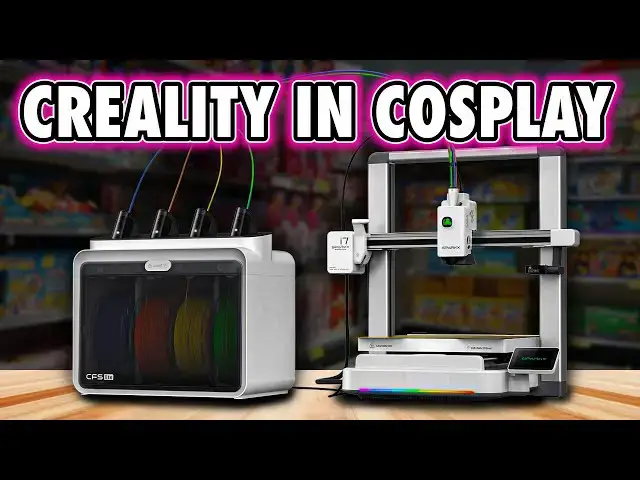
In a few ways, the Spark X i7 actually
0:02
does some smart things that other brands
0:04
should be paying attention to. And the
0:06
presentation alone makes it very clear
0:08
who this is for. Entry-level everyday
0:11
users. And honestly, that's not a bad
0:13
thing. But at the same time, this
0:15
printer also embodies a lot of what has
0:17
become increasingly frustrating about
0:20
Creity as a brand. to the point where I
0:22
think the people who are most likely to
0:24
buy this are either firsttime buyers or
0:27
just people who simply don't know any
0:29
better yet and they're probably not
0:31
watching my videos. Don't get me wrong,
0:33
this will attract people and it will
0:35
suit a lot of new users, but if you
0:38
followed Creity for a while, this is
0:40
very much another round of, "Oh, really?
0:43
Come on, guys." So, let's just get
0:46
through it properly so you can make an
0:48
informed decision on what printer to buy
0:50
next. Hi, I'm Ross and this is Farhammer
0:53
Videos. Let's talk about the Spark X i7.
0:57
First up, I'll be honest. I was confused
0:59
by this one. I was actually told that
1:01
this isn't being marketed as a Creality
1:03
product at all. SparkX is apparently a
1:06
whole new brand. A bit like how
1:08
Piocreate became the face of Creality's
1:10
resin machines, whilst they're telling
1:12
us that's also a different company, even
1:15
though the products are on the Creality
1:16
website and they share the same booth at
1:18
places like Form Next. Yeah. So here on
1:21
the box you've got Spark X I guess like
1:24
SpaceX front and center. This is the i7
1:28
and then quietly underneath powered by
1:30
Creality as though people are going to
1:32
take that as a good thing. Anyway, at
1:34
least at the time of recording there's
1:36
no SparkX website. No separation beyond
1:39
the Sparkx name coming first. So I guess
1:42
let's do what this channel's known for
1:44
and just say it straight. This is just
1:46
another Creity printer. And I have to
1:49
ask, why introduce this confusion at
1:52
all? Is it because they've realized the
1:54
Creity name carries some baggage now?
1:56
Are they actively trying to soften that
1:58
association for new buyers? Whatever the
2:01
reason, it's a level of pretense that
2:03
just irks me and feels misleading no
2:05
matter what way I try to rationalize it.
2:08
Remember that thought. We're going to
2:09
come back to it later. Now, the printer
2:11
itself is a medium-siz bedser, and
2:14
thankfully, it's mostly assembled out of
2:16
the box. In fact, it's one of the most
2:18
assembled printers out of the box I've
2:20
ever had. Setup is simple. Remove a few
2:23
shipping clamps, connect the filament,
2:24
and power it on. That's literally it.
2:27
Now, there are a few different
2:29
configurations depending on what you
2:30
buy. The entry-level version just has a
2:33
basic filament holder that clamps on the
2:35
top of the frame. Perfectly functional,
2:37
nothing exciting. Then there's the
2:39
autofill module, which I don't have. And
2:42
this is an open air dual reel loader.
2:44
not really a color changer, more of just
2:46
an automatic loader with a backup reel.
2:49
And honestly, for most people, I think
2:51
this is the best option. And then
2:53
there's the combo with the CFS Lite, a
2:55
fourcolor enclosed unit intended for
2:58
color changing. And I'll come back to
3:00
that in more detail later. Now,
3:02
externally, this machine is very clearly
3:04
styled to go after the everyday crowd.
3:07
And I think a lot of existing Creity
3:09
users will immediately compare this to
3:11
the Creity High, which is mechanically
3:14
very similar, but that has a much more
3:17
industrial look. This one's softer,
3:19
cleaner. It It's got white plastic. It's
3:22
designed to appeal to a different buyer.
3:25
Now, that said, you can physically feel
3:27
where the costs have been saved. The
3:29
plastics don't feel as premium as some
3:31
of its direct competitors. And then
3:33
there are elements like the corner
3:35
covers on the arms that just pull away a
3:37
little too easily. This stuff isn't a
3:39
dealbreaker, but it is noticeable
3:41
cheapening. Now, ports wise, things are
3:43
kept pretty minimal. On the left hand
3:45
side, you've got a single USB port for
3:48
file transfer and time-lapse recording.
3:50
And next to that is a six pin connector
3:52
for either the CFS light or probably the
3:55
autofill unit. And then around the back,
3:57
you've got the power socket and rocker
3:59
switch along with this molded extrusion.
4:03
Now, this is actually here for a good
4:05
reason. It stops you pushing your
4:07
printer too close to a wall, which
4:09
protects the shielded cable powering and
4:11
heating the bed from being bent or
4:12
damaged. And that makes sense. But come
4:15
on, look at it. I'm not going to say
4:16
what it looks like cuz I might get
4:17
demonetized. But you know what it looks
4:19
like, right? I'm going to assume that
4:21
most of you are seeing exactly what I'm
4:23
seeing. And if so, please drop a comment
4:25
because I won't get demonetized for
4:27
that. But I need the validation so I
4:29
know I'm not losing my mind. And if
4:31
you've got no idea what I'm talking
4:32
about, brilliant. Congratulations on
4:34
your innocence. But I guess this thing
4:36
is for the people who really want to
4:38
love their printers or be loved by them.
4:41
Anyway, flip the machine over, which is
4:43
not a continuation of the comments I was
4:44
just making, and you'll find some small
4:46
rubber vibration dampening feet. Again,
4:49
useful. Now, a feature I do like is on
4:52
the front of the base. There's RGB
4:53
lighting. Now, as a seasoned PC gamer, I
4:56
obviously know for a fact that RGB
4:59
lighting instantly makes any machine run
5:02
better. But jokes aside, this actually
5:04
works well. Yes, it's pretty. That's a
5:06
good thing. But it also acts as a
5:08
progress indicator during printing, and
5:10
then it turns green for complete, amber
5:12
for paused, and red for errors. A color
5:14
I got very familiar with. The screen is
5:17
mounted to the side and flips out nicely
5:19
when you need it, and then folds away
5:20
when you don't. It's a good bit of
5:22
design that may or may not have been
5:24
influenced from other machines. What
5:26
isn't here though is something that's
5:28
become fairly standard of Creality's
5:30
other recent machines, and that's an
5:32
onboard RFID reader for filament on the
5:35
machine itself. That's a feature that
5:37
other brands don't offer and has been
5:39
present on the K2 line and even the
5:42
Creity High. On this machine, RFID is
5:45
reserved for the CFS Lite and presumably
5:48
the autofill unit, too. Something else
5:50
to remember for when we get to the
5:52
conclusion. Now, mechanically, the
5:54
printer appears solid. The frame is made
5:56
from metal rails with a metal crossbar,
5:58
and the Z axis uses dual lead screws. X
6:01
is belt driven across a linear rail, and
6:03
the bed is belt driven, moving on two
6:05
steel rods. Now, the heat bed itself is
6:07
fairly thin on a plastic body that gives
6:09
it the appearance of a thicker
6:10
component. And this uses a dual-sided
6:13
spring steel PEI plate that slots into
6:15
place via a plastic guide tap. Build
6:18
volume is 260x 260, which is slightly
6:21
larger than the now common 256 mm
6:24
standard, a size constraint that many
6:26
model designers already target. So the
6:29
point here is that this should fit the
6:30
vast majority of models available online
6:33
from various sources. Z or Z height,
6:36
however, is only 255 mm, and that's
6:39
about 4 1/2 cm shorter than the Creity
6:43
High. The tool head is where Creality
6:45
actually deserves some credit. The face
6:47
cover is easily removable, and there's
6:49
even a cutout showing a spinning reality
6:51
logo, which acts as a really useful
6:53
indicator of extruder movement. That's
6:56
genuinely helpful when diagnosing clogs
6:58
or jams. But the bigger win here is
7:01
maintenance access. The extruder gear is
7:03
now immediately accessible via a flip-
7:06
down latch that moves the guide wheel
7:08
out of the way. And on the other side,
7:09
there's a dedicated lock switch for
7:11
immediately accessing the filament
7:13
cutter blade. And replacements of that
7:15
take seconds. But, and you knew there
7:17
was a butt, this brings us to the quick
7:20
swap nozzle. And look, I'm glad it's
7:22
here. Creality took far too long to
7:24
implement this feature in their
7:26
printers, so at least it's finally
7:28
happened. Now, functionally, it works.
7:30
But if I'm being honest, the retention
7:32
clip mechanism itself just looks and
7:35
feels a bit cheap. Now, it does the job,
7:38
but compared to its competitors, it just
7:41
doesn't inspire much confidence in these
7:43
guys being a high-tech company.
7:45
Seriously, is it just me or does this
7:47
feel a little bit embarrassing from a
7:49
technical point of view? The upside, I
7:52
suppose, is that based on Creality's
7:54
track record, we probably don't have to
7:56
worry about this specific implementation
7:58
being carried forward to their next
8:00
machines anyway. Experienced Creity
8:03
customers have been well trained by now
8:05
to expect a new machine far too soon
8:07
after the last. But again, I'm going to
8:10
save this rant for the conclusion. Now,
8:12
one feature worth pointing out is the
8:14
built-in camera, which is embedded into
8:15
the mechanical arm of the tool head, and
8:17
it has a rotatable light diffuser that
8:19
also doubles as a privacy guard, which
8:21
is a nice touch. This is used for remote
8:24
monitoring and generating time-lapse
8:26
videos in theory. During my testing,
8:29
despite having the setting enabled, no
8:31
time-lapse videos were generated at all.
8:34
It's firmware related stuff that will
8:36
likely Okay, actually, I'm going to
8:38
soften that to hopefully. It will
8:40
hopefully be fixed before launch. Now,
8:43
let's talk about the CFS Lite. And I'll
8:45
say this up front. I don't hate it. In
8:48
fact, there are a few things about this
8:50
that I actually prefer over some of the
8:52
competing systems. Access is from the
8:54
front with a door that folds downwards.
8:56
And filament reels just sit on two non-
8:58
mechanical rollers with the feed inlets
9:01
angled sensibly at the top of the unit.
9:03
And it is easy to load filament blindly
9:06
once you get the knack to it. And once
9:08
it's fed in, the buffer does the rest.
9:11
And this also has RFID readers
9:13
compatible with Creality's filament
9:15
tags. Although during my early access
9:17
testing, two of the new colors I
9:19
received, the glow-in-the-dark pastel
9:21
pink and glow-in-the-dark pastel yellow,
9:23
weren't recognized by the firmware.
9:25
Again, something I hope will be
9:28
addressed before release. And also
9:30
unlike the original CFS which had a
9:32
single PTFE tube running from the unit
9:34
to the printer, the CFS Lite uses four
9:37
separate tubes, one for each color,
9:39
feeding into the hub at the top of the
9:41
tool head. And despite my love for their
9:43
original CFS, I've actually come to
9:46
prefer this approach. More tubes
9:48
slightly reduces the possibility of
9:50
snags during feeding, and it also keeps
9:52
the filament ends closer to the hotend,
9:54
which shortens retraction and feed
9:57
lengths during color changes. This
9:59
partially validates Creality's claim of
10:02
faster color swaps partially. Remember
10:05
that. Something else we're going to come
10:06
back to. Now, all that said, I did have
10:09
a few issues that I think are worth
10:10
calling out. Now, first, despite this
10:12
being an enclosed unit, there's very
10:14
little, if any, room for desicant, which
10:18
makes long-term filament storage, like
10:20
keeping things dry, less ideal. And I
10:22
also had some repeated issues with their
10:24
new pink filament, which constantly
10:27
jammed in the tool head. Now, this was
10:29
the only filament that I experienced
10:31
that issue with, and it did eventually
10:33
force me to abandon a multiolor dragon
10:35
print entirely, but we're going to come
10:37
back to print quality shortly. And then
10:39
there's the PTFE tube length. All four
10:42
tubes were the same length on the unit
10:44
they sent me, which resulted in repeated
10:46
unable to feed filament errors from the
10:48
leftmost slot, no matter what I did.
10:50
Once I mounted the CFS light sideways to
10:53
the printer, the issue disappeared
10:55
completely. A longer PTFE tube
10:57
specifically for this slot would have
10:59
solved the problem, which is something I
11:00
hope Creityle learn and adopt before
11:03
general release. And finally, there is
11:05
an important limitation to be aware of
11:07
because the CFS Lite only has a single
11:10
six pin input port. There's no output,
11:12
so no daisy chaining, and this means
11:15
you're limited to four materials and
11:17
Creity have advised me that this printer
11:20
is not compatible with the original CFS
11:22
either. Now, on the software side, the
11:25
UI is broadly what we've come to expect
11:27
from modern Creity machines. In fact,
11:30
most machines are adopting pretty much
11:31
the same UI nowadays anyway. All of the
11:34
main controls are easily accessible from
11:36
the front screen, such as a light
11:37
switch, filament menus. It's got color
11:39
syncing back to the slicer. It's also
11:41
got deeper options for calibration,
11:43
Wi-Fi, RGB lighting effects, and network
11:46
settings. There's nothing particularly
11:48
surprising here. But despite claims that
11:50
this is an easier printer to use, this
11:53
UI along with the slicer is exactly the
11:56
same as what Creality have put out
11:57
before on every other printer. So
12:00
despite the look of this machine, it
12:02
operates in exactly the same way as all
12:04
of their other machines. And when it
12:06
comes to Creality's version of Orca,
12:08
I've had to say this in every Creity
12:10
review. This is worse than every other
12:12
branded version of Orca. Not because
12:14
it's bad coding, but because reality
12:17
have completely rearranged the UI. And
12:19
this is enough to break the usefulness
12:21
of so many existing online guides for 3D
12:24
printing in general for when you want to
12:27
achieve specific things. Now, one of the
12:29
biggest strengths of 3D printing as a
12:31
hobby, well nowadays anyway, is largely
12:34
that knowledge is brand agnostic. Creity
12:38
actively undermine that by changing
12:40
things unnecessarily and with no
12:43
positive value. Also, we need to point
12:46
out that reality are pushing AI features
12:48
with this machine. And look, AI modeling
12:51
is still a very divisive topic. People
12:53
are for it. People are against it. Most
12:55
people probably don't care. But that's
12:57
not the argument I'm making here or even
13:00
really getting involved with. I'm just
13:02
telling you they promote it. Feel free
13:04
to share your feelings on the topic
13:06
below in the comments. My point is
13:09
simply this. These features aren't
13:11
exclusive to the Spark X i7. They're
13:13
part of Creity Cloud. They require a
13:15
subscription and they use a credit based
13:18
system. Now, you do get a year of Creity
13:20
Cloud included, which they claim is
13:22
worth $79.99 on the website, and for
13:24
that you get 30 credits a month, except
13:27
when you actually visit the signup page,
13:29
they're selling that yearly subscription
13:31
for $59.99. So, more misleading things
13:34
that overinflate the value so it looks
13:36
better when it's not true. See my point?
13:39
Yeah. But yeah, the thing is this isn't
13:42
really a Spark X i7 feature at all. Now,
13:45
when it comes to print quality,
13:46
unfortunately, I haven't had the best
13:48
experience, but this is a pre-release
13:51
machine after all, even though I've had
13:53
many other pre-release machines that
13:55
printed better out the box. Anyway,
13:57
let's just go through my results. The
13:59
initial benchie from the onboard profile
14:01
was generally fine, but the outer shell
14:03
was a little rough. The first layer test
14:06
wasn't perfect either, showing minor
14:08
under extrusion in some parts. But this
14:11
was still fairly typical for most modern
14:13
printers. So, there's no fault there.
14:14
The issues first came when I did this
14:16
multiolor dragon print, which I
14:18
mentioned earlier, because that suffered
14:19
heavily from the repeated clogs caused
14:22
by the pink filament, resulting in
14:23
visible gaps before the print ultimately
14:26
failed entirely. And I then ran off a
14:29
couple of multiolor space marine helmets
14:31
inspired by Elevated Systems recent
14:33
video where he printed some shrunken NFL
14:35
helmets. Now, the smaller helmet had
14:37
gaps due to thin walls, and that's on
14:40
me. You can't blame the printer for
14:41
that. But the surface quality was still
14:44
rough. The larger helmet, which printed
14:46
at the same time on the same bed, also
14:48
showed similar issues, including
14:50
inconsistent surfaces and layer tearing
14:52
on the left side. But more importantly,
14:55
material handling during color changes
14:57
caused serious problems. I ran this
15:00
print using three colors, blue, black,
15:02
and red. And I loaded in two red reels,
15:05
expecting the printer to automatically
15:07
transition on runout. It didn't. But
15:10
then when I manually swapped the empty
15:12
reel with a new one, the printer
15:14
proceeded, for some unknown reason, to
15:17
lay down an entirely red layer,
15:19
completely ruining the print before
15:21
going back to understanding that it
15:24
needs to do color changes. And the exact
15:26
same thing happened on a Vault Boy
15:27
model. When I paused the print to swap
15:29
colors manually, the second pause in the
15:32
print resulted in a full yellow layer
15:34
being injected across the model's face.
15:37
A firmware update pushed by Creality a
15:39
few days later appeared to fix this
15:41
behavior, but all of these surface
15:43
quality issues did remain. And
15:46
importantly, the defects I'm seeing are
15:48
consistent across multiple models
15:50
printed at the same time, such as the
15:52
recess defect on the final model's
15:54
cheeks. And that consistency strongly
15:57
infers that this is a profile issue
15:59
rather than loose mechanics. Because if
16:02
it was loose mechanics, the defects
16:04
would be in random places across two
16:06
models printed at the same time. And
16:09
look, despite assurances from reality
16:11
that this isn't representative of what
16:13
other users are seeing, for me, in
16:16
fairness, this is actually very
16:18
representative of what many users expect
16:21
from early reality releases. For a while
16:24
after any new product comes out, we're
16:26
waiting for things to be finalized.
16:28
That's just part of the course now.
16:30
Anyway, remember earlier when I
16:32
mentioned the faster color changes? This
16:34
is the other half of that story. Some of
16:37
that speed comes from the slicer simply
16:39
not purging enough material during color
16:42
swaps by default because dark colors
16:44
have obviously bled into lighter ones.
16:47
On the Space Marine helmet, blue layers
16:49
are visibly darkened where black was
16:51
printed before it. Vault Boy's teeth are
16:53
yellowed from his hair. His skin has
16:55
darker rings from the layers in line
16:57
with the eyes. Now, of course, you can
16:59
fix this manually by increasing purge
17:01
volumes over the one times multiplier in
17:04
the slicer, but out of the box, those
17:07
quote unquote faster color changes are
17:10
partially achieved by just expuning less
17:12
material than they should be to achieve
17:15
a decent quality. So, here's the
17:18
conclusion, and let's just cut to the
17:19
point and be blunt about what this
17:21
actually is. More than anything, the
17:23
Spark X i7 really shows us who Creality
17:26
are right now. And when the reality high
17:28
already exists, you do have to stop and
17:30
ask, what is even the point of this
17:33
machine? Seriously, actually pause the
17:35
video and think about that for a second.
17:37
What have they changed here and why?
17:39
Because this isn't really an evolution
17:42
of what has come before. So, please tell
17:45
me what you think in the comments. Maybe
17:47
this is why they've changed the name.
17:49
Maybe this is another new direction for
17:52
Creity, one more focused on the general
17:55
consumer. But I've been around them
17:57
enough to just feel like this is another
18:00
level of complexity and mess in an
18:02
already confusing lineup of their
18:04
machines. It's hard enough deciding
18:06
between all the printers on the market.
18:08
So feel free to go and work out the
18:10
differences between all the machines in
18:12
just Crealities lineup. So, I can't look
18:15
at this and pretend that the high
18:17
doesn't exist when it's at such a
18:19
similar price point because what I'd
18:21
rather have seen here is a mashup of
18:23
that with the enhancements they added
18:26
this time around. In some ways, this is
18:29
a downgrade from the high. It's cheaper,
18:31
but it feels cheaper. Smaller build
18:33
height, no NFC reader on the body, and
18:36
even though, to be fair, they've finally
18:38
implemented some genuinely useful user
18:41
convenience features in the hotend.
18:44
Look, at the end of the day, this this
18:45
is just a copy of another brand's
18:47
machine, and they flipped everything on
18:49
the left side to the right to make it
18:52
not look completely obvious. This
18:54
release, once again, highlights the
18:56
issues that the printing community has
18:59
with Creality as a brand. They're not
19:01
learning from their own previous
19:03
releases and what other things are on
19:05
the market, whilst iterating and
19:07
improving in a clear direction to give
19:09
us better printers. They're just looking
19:11
at what's popular in the market and
19:13
releasing their cheaper version of it.
19:16
And we all know what that usually means
19:17
when it comes to long-term quality, not
19:20
just in 3D printers. We know it from
19:22
pretty much every product category.
19:24
Other brands are releasing generations
19:26
of machines, deliberately building
19:28
ecosystems where things like hotends,
19:30
build plates, and multimaterial systems
19:33
carry forward and lock customers in for
19:35
the right reasons. They're building
19:37
consumer trust. Creity by contrast feel
19:41
like a collection of isolated teams all
19:44
pushing out different machines with
19:46
different design languages and different
19:48
compatibility because that's the only
19:50
way a company with this many products
19:52
can move this fast. And I know some
19:55
people will say just review the printer.
19:57
Stop ranting about the company. Well, I
19:59
did just review the printer. It works.
20:02
It's probably fine. It's it's an average
20:04
mediocre bedslinger. Woo woo. Unless of
20:07
course you get a bad one and you have to
20:08
fight support, which again is part of
20:11
why company ethos matters. It matters
20:14
more than the hardware in my opinion
20:16
because the mess at the top travels all
20:18
throughout the company's core and it
20:20
shows up in hardware, software, and
20:23
support further down the line. Compared
20:25
to other brands, Creity is just messier,
20:28
less cohesive, and less inclusive as an
20:30
ecosystem. That said, if what you want
20:33
is a cheap beds sllinger more than
20:35
anything with color changing and your
20:37
primary concern is getting the lowest
20:40
price possible, then sure, grab the
20:42
Creity A1. I mean the sorry, the Spark X
20:45
i7. For an everyday user, it'll do the
20:48
job. Just go into it understanding why
20:51
you don't hear people screaming, "Oh,
20:53
you've got to get a Creity printer."
20:56
There's nothing here that truly stands
20:58
out. It works and it's very clearly just
21:01
a machine dressed up to copy homework
21:03
done by another brand whilst hoping it's
21:06
not too obvious. I want to say thanks
21:08
for watching with a huge thanks going to
21:10
our members who are on screen now.
21:12
Please consider joining them. That'll
21:14
get your name in lights. It helps me
21:15
keep the lights on and you'll also get
21:17
early access and some exclusive videos.
21:20
If you do decide to buy this printer,
21:21
again, look, it's not terrible. It's
21:23
fine. But I hope I've at least opened
21:26
your eyes to it and been real with you
21:27
about it. So, if you can respect that
21:29
I've been solid enough to do that, would
21:31
you be solid enough to click my
21:33
affiliate link below this or any video
21:35
where you choose to buy a printer? I
21:37
make a commission and that's at no cost
21:39
to you. And of course, reality sent me
21:41
this printer free of charge for the
21:42
review. I don't think anybody's doubting
21:44
that these words are not my own. Thank
21:47
you again for watching. Until next time.
21:49
Okie dokie. It's quite a new quote, but
21:51
does anyone know what it's from? Yeah,
21:53
of course you do. Until next time,